- All proxies are mobile, clean, anonymous, and highly trustworthy.
- Mobile proxies can be used in any software; below you'll find the most popular ones.





What Are Datacenter Proxies and How Do They Work?
- Yinhao Lee
- 12 minutes
A datacenter proxy is an intermediary server that forwards requests using an IP from a hosting company, cloud provider, or data center. Your office connection uses a consumer ISP address, but a rented machine in a hosting facility uses a hosting-network exit IP.
- What it is: a proxy type tied to commercial IPs.
- How do datacenter proxies work? The site sees the exit IP, not yours.
- Why people use it: speed, low cost, and scale.
- Main limit: sites can often recognise hosting-network IPs.
What Is a Datacenter Proxy? Meaning Explained
What is a datacenter proxy? It is an intermediary service that sends your requests out through an address tied to a hosting company, cloud provider, or commercial data center.
The destination sees that exit IP instead of your own. Because this address comes from server infrastructure, it is not linked to a consumer ISP like your office or home connection. The word datacenter only describes network origin. It does not reveal whether the service keeps one exit point, rotates many, or speaks HTTP, HTTPS, or SOCKS5.
Datacenter IP: the address assigned to rented server infrastructure.
Datacenter proxy: the service that routes your traffic through it.
This arrangement is useful when you need a separate, predictable outbound address. It also explains why datacenter proxies can be run in large numbers. The target site evaluates the provider's network, not your local router.
For example, a company may rent a cloud server to run a price-checking script. The machine receives a datacenter IP address. If the script sends its requests through it, the arrangement works as a datacenter proxy. Such services are therefore defined by where the exit IP is registered, not by the software, rotation style, or protocol in front of them. This is the practical datacenter proxy meaning: your own address stays private, while the remote site evaluates the rented one.
Datacenter IP vs. datacenter proxy
A datacenter IP address is the numeric exit point attached to hosting infrastructure. It identifies a rented machine, not the forwarding setup itself.
A datacenter proxy is the service that routes your traffic through that endpoint. On a household connection, a consumer ISP usually supplies the visible source. In this case, a facility-hosted machine supplies it. For example, if a cloud instance forwards scraping requests, it provides the datacenter IP and acts as the actual proxy. That distinction matters when a site evaluates the source of a request.
Who owns datacenter IPs?
Datacenter proxies use addresses assigned to commercial infrastructure, not home lines. These IP ranges are registered to hosting companies, cloud companies, or data center operators. Public registries publish that ownership. A website can run an IP ownership lookup on the exit address. It can then see whether the address belongs to a server network or a consumer ISP. The result is not a perfect verdict. Shared ranges, resellers, and stale records can blur the picture. Still, ownership data gives sites a quick first signal. That is why they can be treated differently even when requests look normal.
How Does a Datacenter Proxy Work?
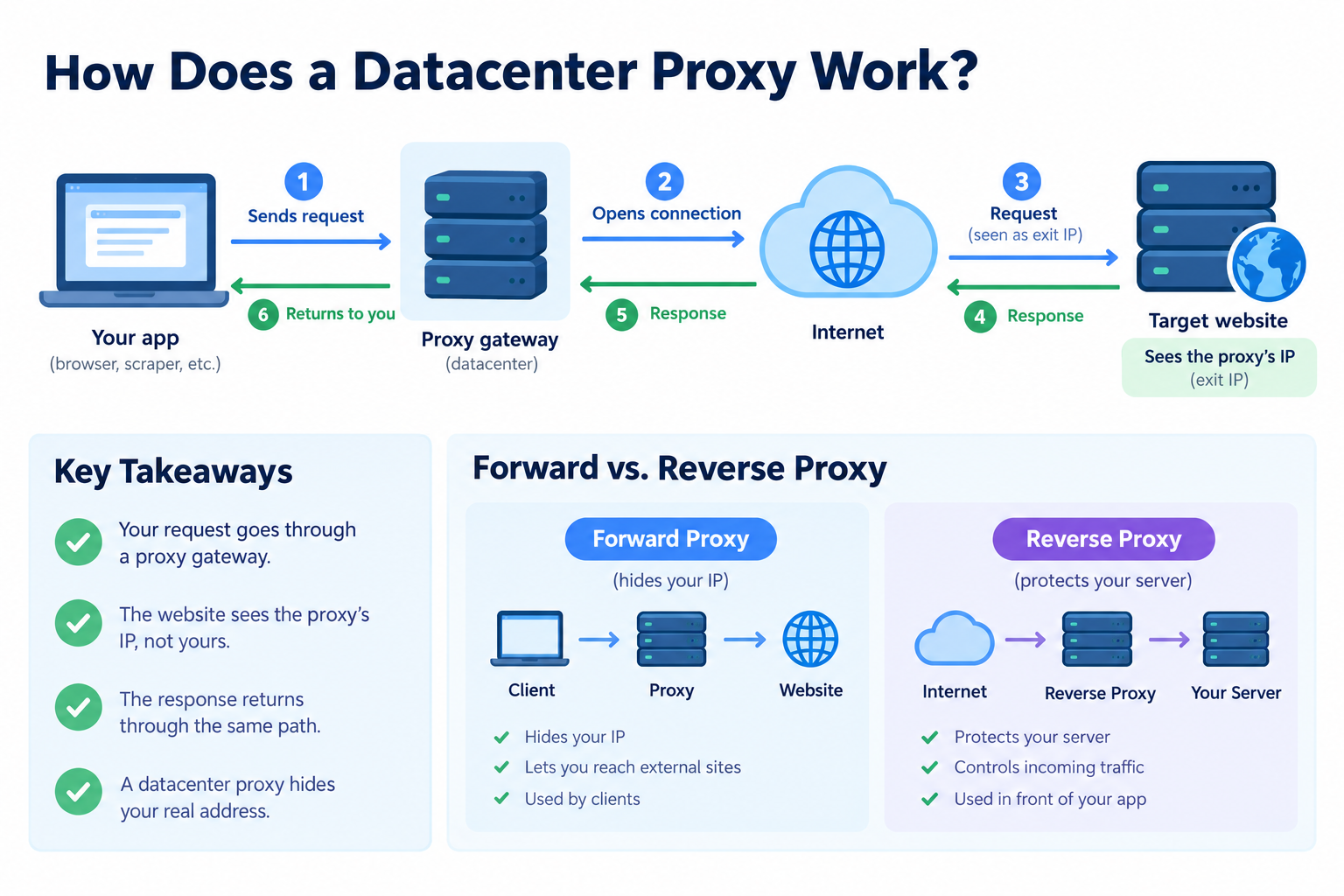
A datacenter proxy sits between your software and the target website. The requesting app can be a browser, a scraper, or a monitoring utility. It sends the request to the gateway first. The service then opens its own connection to the destination. The website answers to the exit IP, not to your machine. The answer to “how do datacenter proxies work” is this substitution.
Such a setup usually acts as a forward proxy. It serves clients that want to reach external sites. It hides the originating address from the destination. A reverse proxy works the other way. It protects a server and controls traffic reaching that server. You usually deploy a reverse proxy in front of your own application. You use a forward proxy when your traffic needs to leave through another address.
In practice, the proxy runs on a server in a hosting facility. Its address comes from the hosting network. When the request leaves the machine, the target website sees the hosting IP as the source. It may log the address, check its reputation, or apply rules based on it. Your office IP does not appear in the request headers unless your application adds it.
The service often exposes a proxy gateway. This endpoint accepts your request and your credentials. It then chooses the outbound connection. The exit IP may be fixed for your session or chosen from a pool. The target only sees the final address.
For example, if a marketer's script checks a competitor's public product page, the request goes through the proxy first. Its access log records the exit IP instead. It does not log the marketer's office connection. If the page limits requests by address, it applies those limits to the proxy address.
The return path follows the same route. The website sends the response back to the exit IP. The proxy receives it and forwards it to your application. To the client, the response looks like a normal reply from the website. The destination does not need to know the requester's real address.
The request flow, step by step
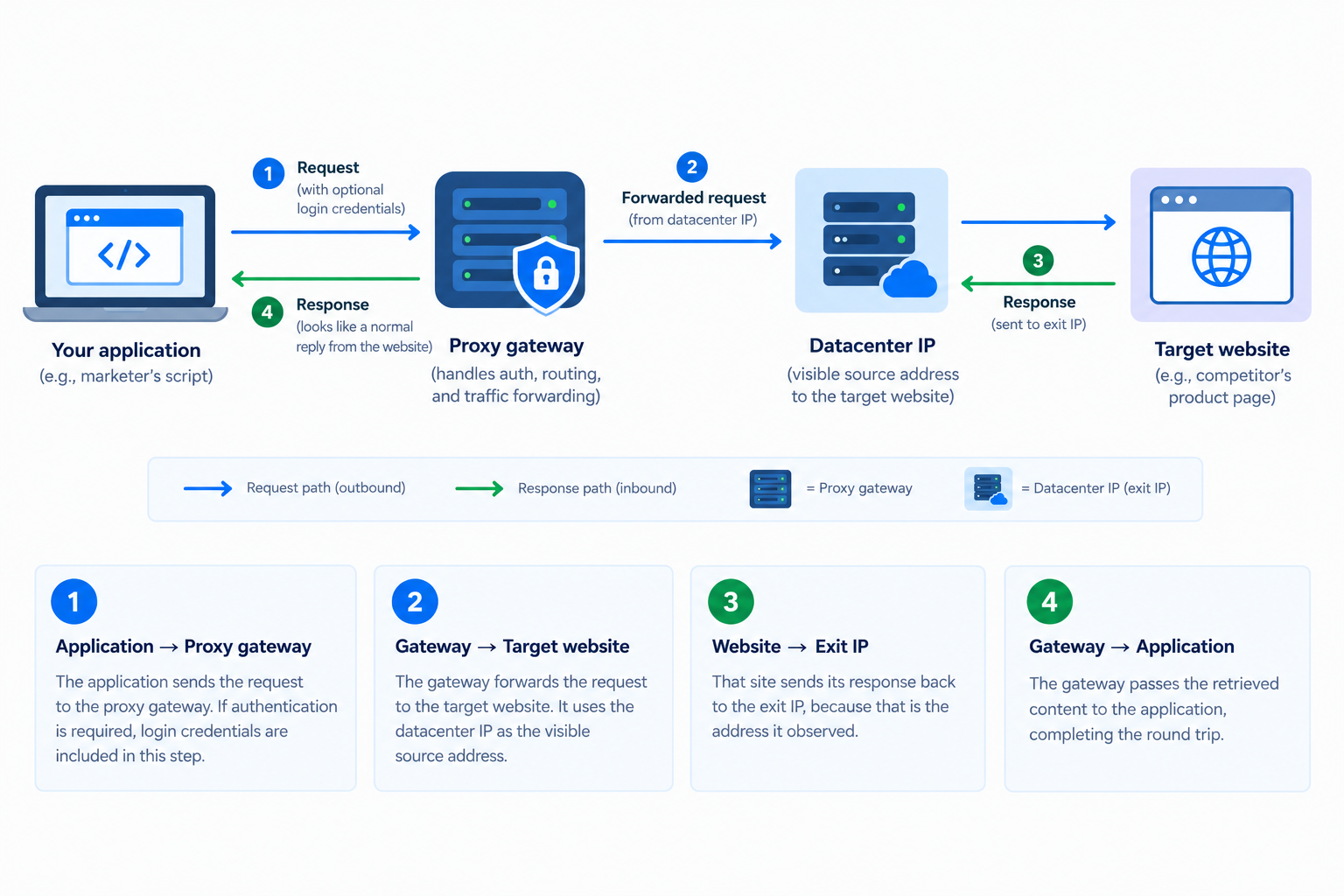
- The application sends the request to the proxy gateway. If authentication is required, login credentials are included in this step.
- The gateway forwards the request to the target website. It uses the datacenter IP as the visible source address.
- That site sends its response back to the exit IP, because that is the address it observed.
- The gateway passes the retrieved content to the application, completing the round trip.
Some deployments also keep a cache. In that case, repeated requests can be answered locally without contacting the destination again.
What the website actually sees
The target website sees the proxy’s exit IP, not your device address. It may then judge the datacenter IP through several signals:
- Network association: hosting network or consumer ISP.
- IP reputation: prior abuse, spam, or fraud reports. A lookup tool can check an IP's reputation.
- Request rate: how many pages arrive from one source.
- Location: whether the address matches expected geography.
- Client behaviour: headers, timing, and interaction patterns.
Anti-bot systems weigh these factors together. A hosting origin raises scrutiny, but it does not decide every request. The final result depends on the site’s rules, the page’s sensitivity, and the full request context. No proxy type guarantees a given outcome.
Static vs. rotating datacenter proxies
These labels describe exit-IP behavior, not network origin. Both variants still use hosting infrastructure.
Static A static proxy keeps one exit IP for the assignment period. It suits tasks that need a stable address. Rotating A rotating proxy draws from an IP pool per request or on a timer. Rotating datacenter proxies may also use a sticky session for a set window.
Rotation helps with rate limiting by spreading requests. If one IP allows 60 requests per hour, 1,000 IPs can carry about 60,000 requests. That assumes the target site accepts hosting ranges. It does not change the IP classification.
Why Use Datacenter Proxies?
Why use datacenter proxies? They fit tasks where a site does not check address ownership. An SEO team can crawl its own large site from several locations. No bot protection is involved, so cheaper and faster access is sensible.
Their advantage is hosting-network throughput at a lower price point. That makes them useful for bulk fetching, monitoring and automated checks where the destination only sees an IP and does not inspect its origin.
- Speed: Datacenter proxies use server-grade connections and often return pages quickly.
- Cost: They usually cost less than residential or mobile options.
- Scale: Datacenter proxies are easy to obtain in large pools for parallel jobs.
- IP stability: Static addresses stay predictable for sessions, allowlists or repeated checks.
- Tool integration: Scripts, crawlers and HTTP clients accept these addresses with little setup.
Quality still varies by provider, route and shared capacity. The type alone does not guarantee low latency. A quick check can confirm status and test a proxy's speed before production use.
What Are Datacenter Proxies Used For?
What are datacenter proxies used for? They support authorized data collection and testing when target site policies allow hosting-network traffic. The fit depends less on the address type itself and more on whether the destination checks address ownership. These use cases work best when the task is legitimate and the platform does not classify hosting IPs as risky.
Web scraping of public data
Web scraping of public data is the most common fit. If a site publishes catalogues, listings, or market research without strict bot protection, datacenter proxies can spread requests across many IPs. This helps stay below per-IP rate limits and speeds up collection. Scraping frameworks and headless browsers can route each request through a different exit address when the target allows it. For example, a script can fetch product pages from several regions without sending all traffic from one address.
SEO and price monitoring
For location-specific checks, the proxy location should match the market you observe and the language you expect. Search results and e-commerce pages change by place and language, so location targeting makes the view realistic. This matters when price monitoring must reflect what local shoppers see. Teams usually apply this to rank tracking, competitor pricing, and SERP checks. Start with a small authorized test. Confirm that pages load cleanly and the data is consistent before increasing request volume.
Automation, QA, and ad or app testing
Development and QA testing teams can route one application’s traffic through a chosen network location. This keeps checks separate from the office connection and makes results easier to reproduce. For example, a travel-tech startup can check how its own landing page renders for visitors from different regions before launch.
- Localized content: confirm that a landing page shows the right region, currency, or language before release.
- Parallel testing: run the same checks from separate addresses at the same time.
- Ad verification: view an authorized campaign as the intended audience sees it in each market.
High-volume internal work and public APIs
Some internal and API-heavy tasks care mostly about throughput, not how the exit address looks.
- Uptime monitoring of your own services from several locations.
- Link checking and crawling your own sites for broken pages.
- Bulk file or asset retrieval from approved internal sources.
- Public APIs that rate-limit by IP but do not fingerprint clients.
When the target only counts requests, speed and price beat IP trust. These jobs reward stable routes more than reputation.
- Public-data scraping: useful when pages are open and the main constraint is per-IP request volume.
- SEO and price checks: helps view location-specific results while keeping automated queries separate from office traffic.
- QA and ad testing: lets teams repeat tests from selected network locations without changing their own setup.
- Internal crawling and APIs: efficient for high-volume authorized jobs where the endpoint only applies simple rate limits.
Where Datacenter Proxies Fall Short
Retail, travel, ticketing, social platforms and search engines often run bot protection that checks IP ownership first. A hosting range is easy to classify, so these sites may challenge the request, show a CAPTCHA, or return an empty response. Poor IP reputation raises the odds too. Configuration tweaks do not change the address origin.
A common mistake is buying rotating datacenter proxies for a protected retail site because rotation looks like a simple fix. The pool spreads requests and can ease rate limits, but it does not change IP classification. If the site blocks hosting ranges, each fresh address can still trigger challenges. The team then burns budget on retries, slows monitoring, and pays more per successful page.
- Retail: protected product and price pages.
- Travel: fare and availability checks.
- Ticketing: high demand inventory flows.
- Social platforms: login and feed protection.
- Search engines: result personalization and abuse controls.
Classification does not decide every request. It only raises the odds of friction. A small test on the real target reveals likely issues before scaling.
If a site is sensitive to network origin, OnlineProxy’s mobile proxies on real carrier IPs are a different category. They use real 4G/5G IP addresses through modems and SIM routers with real SIM cards. Platforms see ordinary mobile-network traffic, though results depend on the destination and workflow.
Datacenter vs. Residential vs. Mobile Proxies at a Glance
Criterion | Datacenter | Residential | Mobile |
|---|---|---|---|
IP source | IPs registered to hosting or commercial cloud providers | IPs assigned by consumer ISPs to home lines | IPs issued by carriers to active cellular devices |
Typical speed | Fast stable server-grade links under normal shared load | Variable dependent on home connection quality and routing | Variable affected by signal strength and carrier load |
Relative cost | Usually lower for equivalent bandwidth and traffic scale | Usually higher because genuine home addresses are scarce | Varies widely by country carrier and available supply |
How easily a site can classify the IP | Often identifiable through public hosting range lookup tools | Harder to separate from ordinary household visitor traffic | Harder for sites expecting normal carrier network traffic |
Typical best-fit tasks | Datacenter proxies suit low-sensitivity high-volume internal automation tasks | Checks needing a plausible home broadband connection appearance | Workflows requiring carrier-like presence or mobile app behavior |
If ownership is unchecked, datacenter proxies trade trust for cheap speed. If consumer-ISP appearance matters, residential trades higher cost for lower risk. If mobile sensitivity matters, mobile trades predictable performance for carrier acceptance. A small authorized test should precede any scaling.
FAQ About Datacenter Proxies
Are datacenter proxies the same as VPNs?
A VPN usually creates a device-level encrypted tunnel. A proxy is commonly configured per browser, application, or request flow. It may route only one scraping script, not your whole laptop.
Can a datacenter proxy be static or rotating?
Yes. The term describes the IP source only, not address behavior. A static proxy keeps one address, while a rotating proxy changes addresses from a pool.
Can datacenter proxies be detected?
IP detection can classify an address range as hosting infrastructure. That raises friction risk, but classification alone does not guarantee a block, CAPTCHA, or failed request.
Are datacenter proxies always faster than residential ones?
They are not always faster, because speed depends on provider quality, route, location, shared capacity, and protocol. A lightly loaded server can be quick, while a crowded route may lag.
Should I use a free datacenter proxy for business work?
Treat a free proxy with care and check reliability first. Review data handling and never send sensitive data through unverified services, because they may log traffic, inject ads, or fail under load.
Conclusion: Is a Datacenter Proxy Right for Your Task?
A datacenter proxy is a fast, economical choice when the target does not check IP ownership. It is a weak choice when the target treats hosting-network addresses as suspicious. Define the task requirements, confirm what the target allows, and run a small authorized test before scaling. For example, send 100 test requests to the real target and measure its success rate, not just speed.