- All proxies are mobile, clean, anonymous, and highly trustworthy.
- Mobile proxies can be used in any software; below you'll find the most popular ones.





Change proxy protocol
- 1 minute
1. You can select the protocol type you need when placing your order. The available options are:
- HTTP – ideal for use in browsers and general web browsing.
- SOCKS5 – provides maximum anonymity and is suitable for specialized software, messengers, or games.
Learn more about choosing a protocol in our article:
HTTP or SOCKS5 protocols: which should you choose?
2. If you’ve already purchased a proxy but realized you need a different protocol, you can change it in your account without buying a new one.
Steps:
- Go to the “My Proxies” section.
- Select the proxy address you need from the list.
- At the bottom of the proxy card, find the “Switch to HTTP/SOCKS5” button.
- Confirm the action.
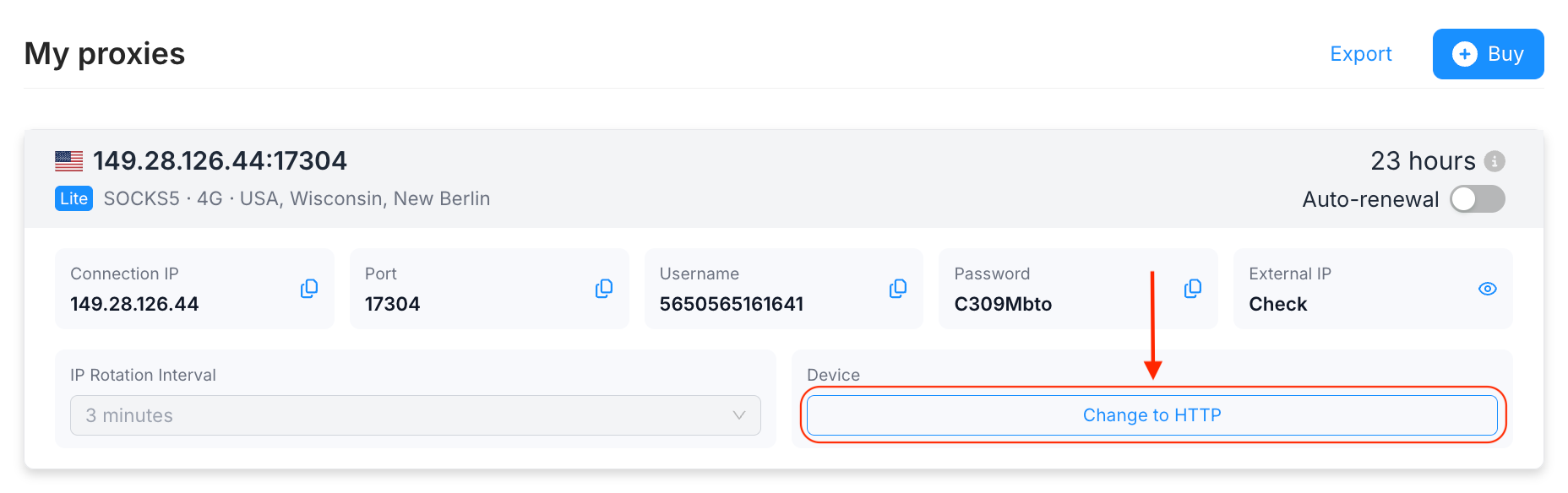
By clicking “Switch to HTTP,” you confirm switching the protocol from SOCKS5 to HTTP, and vice versa.
Important notes:
- Limits: You can change the protocol for each proxy you purchase twice for free. Please use these changes carefully.
- Updating your details: After switching protocols, be sure to check the settings in your software or browser. The current login details are always displayed on the proxy card as soon as you switch.
- Activation time: The switch happens instantly, but in some cases it may take 1–5 seconds for the settings to update on the server.