- All proxies are mobile, clean, anonymous, and highly trustworthy.
- Mobile proxies can be used in any software; below you'll find the most popular ones.













How a Proxy Server Protects a Business: Benefits and Key Uses
- Mark Snowden
- 8 minutes
Why Would a Business Use a Proxy Server? The Short Answer
A proxy server for business is a controlled gateway between the company network and the internet. The IT team uses it for traffic control, request inspection, and activity logging. It also gives administrators consistent visibility. This helps protect a business at one centralized point. For example, an employee at a 40-person accounting firm could click a phishing link. With category and malware filtering, the proxy can block the destination before the page loads.
In brief
- Filter malicious or non-business sites.
- Hide internal systems and IP addresses.
- Inspect and log outbound traffic.
- Speed up repeated web access.
What a Business Proxy Server Is and How It Works
An enterprise proxy receives a client request, checks corporate policy, and forwards that request under its own IP address. The destination server answers the intermediary, not the employee device. This middle role covers the full request/response exchange, allowing caching and consistent business rules. It gives the IT team one place to see and control outbound web access.
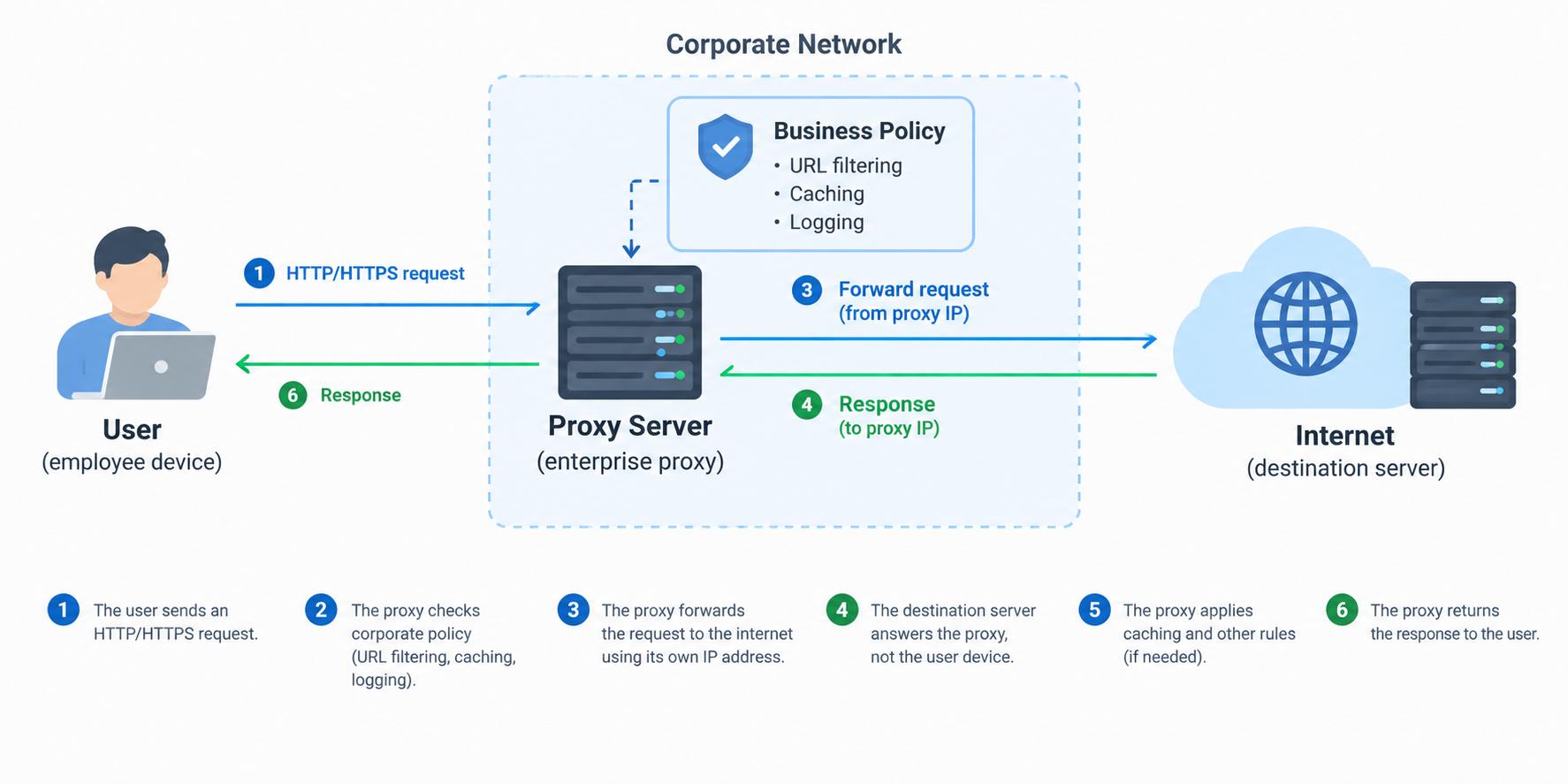
- An employee opens a supplier portal.
- The request reaches the corporate gateway instead of leaving directly.
- Policy checks cover URL filtering, caching and logging.
- The gateway fetches the page from the destination server and returns it.
Unlike a consumer proxy, an enterprise proxy is managed centrally, often transparently, and applies rules to many users. A browser-level variant is usually set manually and lacks network-wide enforcement. At the OSI application layer, this position allows detailed web request inspection and control.
How Can a Proxy Server Protect a Business?
A proxy server for business security interrupts attack chains. It stops phishing, malware, and data exfiltration to limit data breach exposure. This enforces security policy, supports defense in depth, and reduces cyber threats.
Blocking malicious and non-business websites
URL filtering lets a forward proxy enforce the browsing policy before requests leave the network.
For business security, this gateway can stop dangerous destinations and risky material ahead of the user.
- Block known malicious domains.
- Restrict content categories, such as adult or file-sharing sites.
- Apply per-department access control.
For example, finance can be blocked from unapproved file-sharing sites, while marketing keeps social platforms. The side-effect is fewer distractions and fewer incidents. This gives IT practical control through one proxy server, without installing agents on every device.
Access blocked by company policy.
Hiding internal systems behind a reverse proxy
A reverse proxy sits in front of private backend servers. Internet clients see only one public address. This helps protect internal systems from direct attacks and exposure.
- Internet clients reach the reverse proxy.
- It applies rate limiting, WAF checks, and API protection.
- Only approved traffic reaches private servers.
It can also handle TLS termination. For example, an online store can place its order API behind the proxy, which throttles a burst of brute-force login attempts. If poorly secured, though, this layer becomes an entry point.
Inspecting traffic for malware and data leaks
A proxy server can use TLS inspection to decrypt HTTPS after endpoints trust company-installed certificates. This lets it inspect traffic, not just domain names.
- Downloads checked during malware scanning.
- Uploads checked for sensitive data through DLP.
- File types and destinations matched against rules.
For example, if an employee uploads a customer spreadsheet to a personal cloud drive, policy can block the upload and alert IT.
It is the strongest and most demanding protection layer. Decryption needs processing power and can break apps that use certificate pinning. This requires careful rollout.
Logging, monitoring and audit trails
A proxy server records who visited which destination, when, and how much data moved. For a business, this turns routine web traffic into an audit trail.
- Abnormal volume, such as several gigabytes going to an unknown host at 3 a.m.
- Risky destinations tied to malware or data exfiltration.
- User-level activity that helps spot insider threat patterns.
Feed these records into a SIEM for anomaly detection. Protect proxy logs too, because they contain sensitive activity. They also support compliance reviews by showing access decisions over time.
Other Business Reasons to Use a Proxy Server
Business use cases include efficiency and compliance. They offer faster repeat access, lower bandwidth, and consistent policy enforcement. Other common use cases are external-facing tasks like market research, ad checks, and regional testing.
Performance, bandwidth and policy compliance
- Faster repeat access: a cache stores common files and web objects locally.
- Lower bandwidth: one download can serve many users instead of repeated internet requests.
- Balanced server load: a reverse proxy uses load balancing to spread traffic, limiting latency.
In a branch office, 30 staff request the same software update. A caching proxy fetches it once, then serves the rest locally. This helps most in offices with many users requesting the same resource. The same control point also enforces the acceptable use policy and supports compliance checks.
Outward-facing tasks: market research, ad checks and regional testing
Proxies supply an outbound identity for market research, ad verification, price monitoring and geo-testing. A retail team can check ads and product pages as mobile users in another region. One stable mobile IP lasts throughout. See regional ad verification.
When a datacenter IP is not enough
Sites treat mobile carrier traffic as mobile users, so that traffic succeeds where datacenter routes get flagged. OnlineProxy provides mobile proxies on real 4G/5G carrier IPs through modems and SIM routers, with username/password authentication and HTTP or SOCKS5 support. Its Regular plan gives a dedicated device with sticky sessions for a stable IP.
Benefits of a Proxy Server for Business at a Glance
Benefit | How the proxy delivers it | Business outcome | Typical proxy type |
|---|---|---|---|
Threat filtering | Blocks malicious domains and risky categories at the gateway before pages load | Fewer phishing and malware incidents | Forward proxy |
Hidden internal infrastructure | Publishes apps through a reverse proxy instead of exposing direct servers | Backend IPs and systems stay unexposed | Reverse proxy |
Traffic visibility and audit | Records requests, destinations, users, timestamps, and transferred data volume | Faster investigations and cleaner audit evidence | Forward proxy |
Bandwidth savings | Caches repeated files, updates, and pages for reuse | Lower internet costs and faster repeat loading | Forward proxy |
Centralized policy control | Applies one access policy to all teams, devices, and locations | Consistent rules and easier security enforcement | Forward proxy |
Load balancing | Distributes incoming requests across multiple backend servers | More stable performance during heavy traffic spikes | Reverse proxy |
Types of Business Proxy Servers
Choose the type by the traffic path you must control.
- Forward proxy: proxy server for outbound employee requests, best for access control and logging
- Reverse proxy: proxy server in front of internal apps, best for protecting portals and APIs
- Transparent proxy: proxy server that needs no device setup, best for office browsing
- Explicit proxy: proxy server configured on the device or app, best for managed fleets
- HTTP proxy and HTTPS proxy: proxy server for browser traffic, best for URL filtering and logs
- SOCKS5: proxy server support for broader TCP traffic, best for compatible non-browser tools
Datacenter IP, residential IP and mobile IP are source categories, mainly for outward-facing tasks. For example, a firm may run a transparent forward proxy for staff and a reverse proxy before its customer portal. This keeps setup simple while protecting public-facing systems.
Risks and Limitations of Business Proxy Servers
Proxy Server vs VPN vs Secure Web Gateway for Business
A proxy server gives fine-grained web control. It usually does not encrypt device traffic. A VPN encrypts all device traffic. It secures remote access. A secure web gateway adds deeper inspection. It also brings cloud-delivered policy, cost and tuning.
Feature | Proxy server | VPN | Secure web gateway |
|---|---|---|---|
Encryption | Usually none by default | Yes, device-wide | TLS inspection possible |
Traffic scope | Configured app or browser | Whole device | Web and cloud apps |
Main purpose | Filtering, logging, cache | Private remote access | Advanced web security |
Setup complexity | Moderate | Moderate | Higher |
Performance impact | Low to moderate | Moderate | Varies with inspection |
For example, a remote-first firm uses a VPN for internal tools. It uses a proxy for outbound filtering and logs. The trade-off is direct. VPN gives encryption coverage but reduces web visibility. A proxy server gives control but not default device encryption. Many teams combine both.
Best Practices for Deploying a Proxy Server Securely
Deploy a proxy server only after you define the goal, ownership, and failure plan. Treat it as a security control, not just a convenient network shortcut.
- Define whether the deployment filters outbound employee web traffic, fronts public applications, or both.
- Encrypt management and client traffic with valid TLS certificates and approved secure cipher settings.
- Require multi-factor authentication for every administrative account and external service integration.
- Restrict changes through RBAC and separate administrative duties.
- Set log retention, protect stored records, and forward events to centralized logging for analysis.
- Apply patching on a fixed schedule, including the operating system and filtering modules.
- Segment the infrastructure and add redundancy with load balancing to avoid a single outage.
- Monitor anomalies and pair the system with endpoint protection and security alerting before rollout.
For example, an IT manager reviews the access list quarterly and removes a departed contractor’s admin access.
FAQ: Proxy Servers for Business
Does a proxy server replace a firewall?
No. A proxy controls and inspects specific application traffic. A firewall enforces broader network boundaries. It is one control point, not the whole perimeter. Use both where needed.
Is a proxy server good for business security?
Yes, if it is configured, patched, and monitored. It should work with endpoint protection. Free proxies and untrusted public proxies are not safe. They can expose traffic or logs. Require strong authentication and protect logs. Test after changes.
Does a proxy encrypt my traffic?
Not by default. It can filter, log, or forward requests. Encryption depends on the protocol and setup. HTTPS protects data in transit. TLS inspection can reveal decrypted traffic, but it needs trusted certificates. Check app compatibility.
Do small businesses need one?
It depends on team size, remote work, and compliance needs. Consider whether staff handle sensitive data. A small business may start with basic filtering. Add a proxy when visibility or policy control becomes necessary. Detailed web logs can support compliance. Pilot before full rollout.
Conclusion: A Proxy Server Is a Control Point, Not a Silver Bullet
A proxy server for business security is a control point, not a complete shield. It filters threats, hides internal systems, inspects traffic and records activity. It also supports performance and compliance goals. Defense in depth still requires firewalls, endpoint protection and a VPN.
- Run a traffic audit of current internet use.
- Decide whether forward, reverse or both fit your risks.
- Test a pilot deployment with a small group before rollout.