- All proxies are mobile, clean, anonymous, and highly trustworthy.
- Mobile proxies can be used in any software; below you'll find the most popular ones.













How to Scrape LinkedIn Data: Profiles, Companies and Jobs
- Yinhao Lee
- 18 minutes
How to scrape LinkedIn starts with the automated collection of publicly visible information. For example, a recruiter may need 200 public Data Engineer postings and company details in a spreadsheet by Friday. In that scenario, scraping LinkedIn data targets public pages, not login-gated content.
- Define the target dataset and output goal.
- Check legal, ToS, and privacy boundaries.
- Choose Python code, a no-code tool, or an official API.
- Locate JSON-LD blocks or the guest jobs endpoint.
- Send slow requests from clean IPs, respecting rate limits.
- Clean, validate, and export the final records.
This guide covers public data only and does not require logging in. It suits recruiters, marketers, and analysts seeking repeatable results.
Why Scrape LinkedIn?
The practical answer to why scrape LinkedIn is that it turns scattered public signals into structured, repeatable datasets. Teams use it for lead generation, recruitment, competitive analysis and market research because manual copy-paste is slow and purchased lists often decay fast. A refreshable dataset is more current. The output can feed a CRM, spreadsheet or database.
Use case | Data collected | Typical output |
|---|---|---|
Sales prospecting | Names, titles, employers, locations | CRM-ready prospect list |
Recruiting | Public profiles, skills, current roles | Talent map or candidate pipeline |
Competitor monitoring | Job postings, company pages, hiring pace | Trend report in spreadsheet |
Labor-market research | Roles, locations, employment types | Salary or demand analysis |
Investor research | Company size, industry, expansion signals | Investment memo or market brief |
For example, a B2B SaaS marketer can track how many Revenue Operations roles target accounts post each month. A rise in those postings may indicate budget, tooling change or buying intent. The value comes from public data, not private messages. Fresh, targeted records beat stale databases when decisions depend on current signals. These pages often reveal hiring priorities, team growth and geographic focus.
Is Scraping LinkedIn Allowed? Legal and Ethical Ground Rules
The LinkedIn User Agreement prohibits scraping, and the platform enforces it with technical blocks. If you automate requests while logged in, you risk restriction or a permanent ban. Logged-in scraping ties every action to your account. That makes attribution and enforcement easy.
In hiQ Labs v. LinkedIn, the Ninth Circuit suggested that accessing genuinely public pages may not violate the CFAA. Courts may distinguish open content from authenticated areas. LinkedIn later prevailed on contract claims before the settlement, so User Agreement risk remains. Restricted areas carry stronger legal and technical barriers. Treat them as clearly off-limits.
Privacy law still applies to public personal data. Under GDPR and CCPA, minimize stored PII, avoid private contact details, and set a lawful purpose and retention period. Delete records when the original business need ends.
Ground rules
- Only scrape LinkedIn pages that are visible without logging in.
- Keep collection limited to public data needed for a clear purpose.
- Use conservative request rates and stop when access is restricted.
- Do not republish whole datasets or combine hidden profile details.
- Record source URLs and scrape dates for later accountability.
Collecting public company headcount and industry is lower risk. Harvesting EU residents’ names and employment histories into a permanent database without a purpose is high exposure.
What LinkedIn Data Can You Scrape Without Logging In?
Without a login, scraping LinkedIn data is limited to public pages. Open an incognito window. Microsoft’s public company page shows industry, size, headquarters and website. Links that prompt sign-in are out of scope.
For LinkedIn scraping, use only fields that stay visible after the first view. A few public profile visits can trigger a login wall, so keep requests conservative. Structured data often appears in JSON-LD script tags.
Public profiles may show education or experience, but full histories often hide behind sign-in prompts. Job listings are the most reliable public source because guest endpoints return structured cards in public view. The exact fields still vary by profile privacy and region. Private contact details, member-only analytics, Easy Apply and recruiter views stay inaccessible.
Data type | Visible without login? | Where it is found | Difficulty |
|---|---|---|---|
Public profile | Limited fields: name, headline, location, employer | Server HTML and JSON-LD | Medium |
Company page | Yes: industry, size, headquarters, about text | Server HTML and JSON-LD | Low |
Job search results | Yes: title, company, location, date | Server HTML and guest XHR | Medium |
Job page | Yes: description, seniority, employment type | JSON-LD and HTML | Low |
People search | No, redirects to login | Login wall | Not viable |
Employee list | No, member-only area | Not public | Not viable |
Choose Your Method: Python Code, No-Code Tools or the Official API
Before deciding how to scrape LinkedIn, weigh these LinkedIn scraping trade-offs. Python gives full control over public pages. By choosing it for its flexibility, you accept coding and ongoing maintenance. No-code scraping tools start fast. The core trade-off is convenience. To avoid code, you usually hand over a session cookie and accept monthly fees and account risk. Official LinkedIn API routes are stable, but they limit datasets and require approval. This guide follows DIY Python code and briefly covers no-code tools.
Criteria | Python scraper | No-code tool | Official API |
|---|---|---|---|
Setup time | Hours to days | Minutes | Days or more |
Technical skill | High | Low | Medium to high |
Data coverage | Public profiles, companies, jobs | Depends on template and access | Approved member data |
Scalability | Strong with throttling | Limited by caps | Limited by quotas |
Account risk | Lower if public only | Higher when using your login | Low if approved |
Maintenance | Selector and endpoint checks | Vendor fixes | API versioning |
Cost model | Development time and infrastructure | Subscription and usage caps | Compliance and integration effort |
Which should you pick?
- One-off list under a few hundred records: use a no-code tool such as PhantomBuster automation.
- Recurring public jobs or company pages: build Python code.
- Member data or Sales Navigator exports: pursue the LinkedIn API or partner route, not scraping.
For example, a solo recruiter can use a no-code tool for a single candidate list. A data analyst building a weekly jobs trend pipeline should choose Python.
How LinkedIn Detects and Blocks Scrapers
LinkedIn combines several signals into a fraud score. It decides whether a visitor should see content, face a challenge, or get cut off. The platform does not rely on one rule. It weighs many weak signals together.
A typical check flow is: request → IP check → fingerprint check → behavior check → allow, challenge, or block.
- Authentication wall: anonymous profile views are limited. People search and employee tabs redirect to sign-in quickly. This keeps staff directories and most profile browsing gated.
- Behavioral analysis: timing, navigation flow, missing referrers and absent mouse activity matter. A person does not open 100 profiles in a minute. It also watches whether the path makes sense. Direct hits to deep pages look odd.
- Request fingerprinting: IP reputation, address type, TLS/JA3 fingerprint, headers and cookies are compared with normal browser patterns. Default client values from a cloud host look suspicious. Mobile carrier ranges appear safer than a datacenter IP because many real users share them.
For example, if a script fetches 100 profile URLs in one minute, it raises flags. A cloud-server address and default python-requests headers make it worse. It can hit a login redirect after a few pages. A human viewing five profiles an hour rarely triggers the same response.
LinkedIn scraping outcomes range from forced login to throttling, HTTP 429 or 999 errors, CAPTCHAs and bans. A blocked run can also poison the same address range or session. To scrape LinkedIn safely, slow the pace, send consistent browser-like requests, and use clean IPs. This approach stays fragile when it ignores these defenses.
Step-by-Step: How to Scrape LinkedIn Data with Python
This hands-on section shows how to scrape LinkedIn data with Python using only public pages. It does not use login.
- Python 3.10+
- requests or httpx
- parsel for HTML and JSON parsing
- Optional Playwright
pip install requests httpx parsel playwright
These examples are illustrative. Selectors, endpoints and batch sizes change. Test each run first against live public pages before scraping. Start small.
Step 1: Define Your Targets and Prepare the Environment
Define a narrow dataset before writing any parser. Decide whether you need company pages, job results, or both. Create a virtual environment to isolate dependencies. For example, build a CSV with 20 public company URLs plus one search URL for Python Developer in United States. Verify every entry opens in an incognito window without a sign-in prompt. If it redirects to login, remove it.
python -m venv .venv
# For Windows:
.venv\Scripts\activate
# For macOS/Linux:
source .venv/bin/activate

pip install httpx parsel
- Save target URLs in CSV.
- Keep browser-like headers in one config object.
- Set timeouts and a random delay range.
- Use this setup to scrape LinkedIn public pages carefully.
Step 2: Find Where the Data Lives (HTML, JSON-LD or Hidden Endpoints)
Before writing code, find where LinkedIn exposes the hidden data. Do this in an incognito window, because anonymous rendering differs from logged-in rendering. This is the discovery step behind reliable LinkedIn scraping.
- Open the public page for a profile, company, or job.
- Open DevTools with F12 and inspect the rendered document.
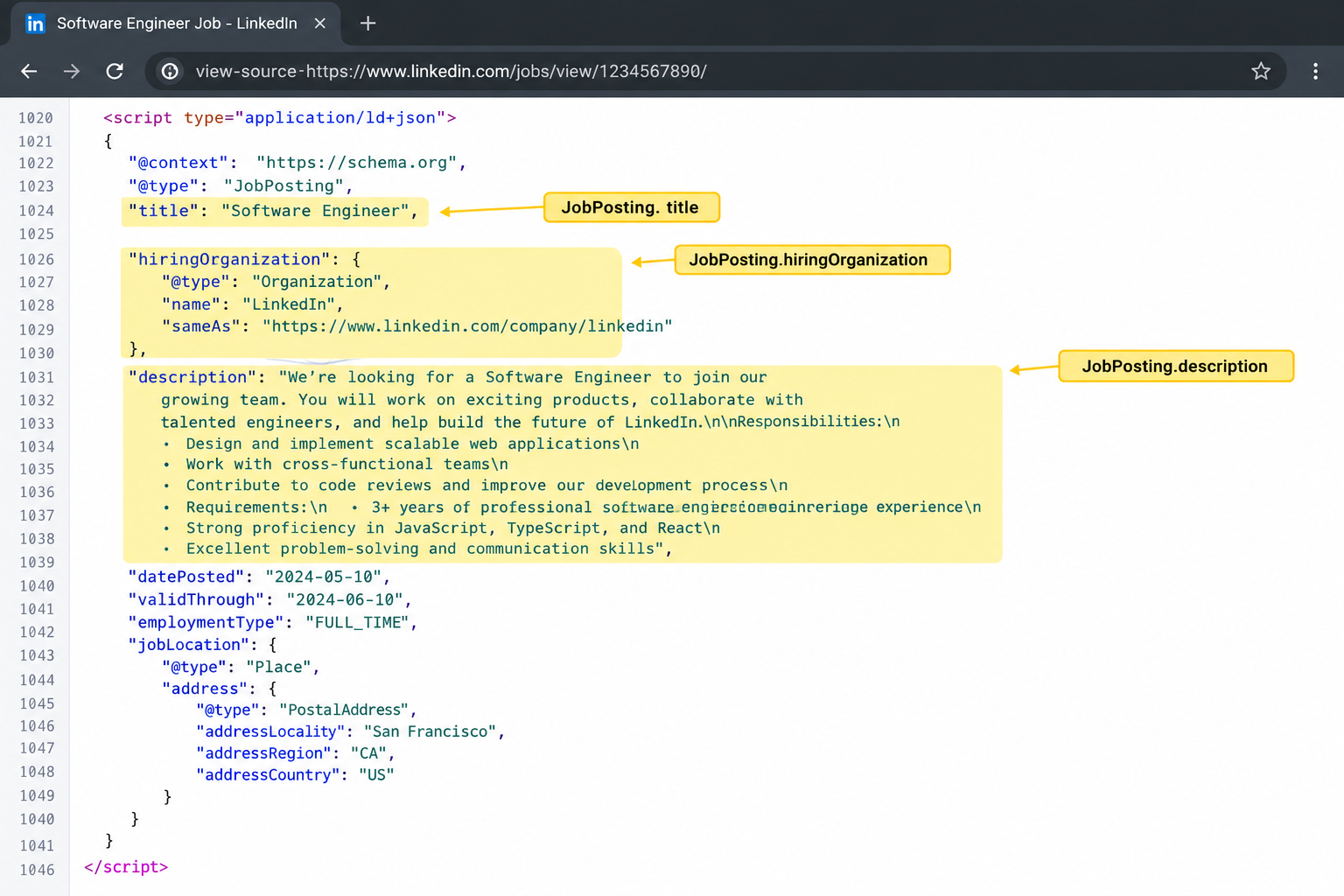
- Search the source for
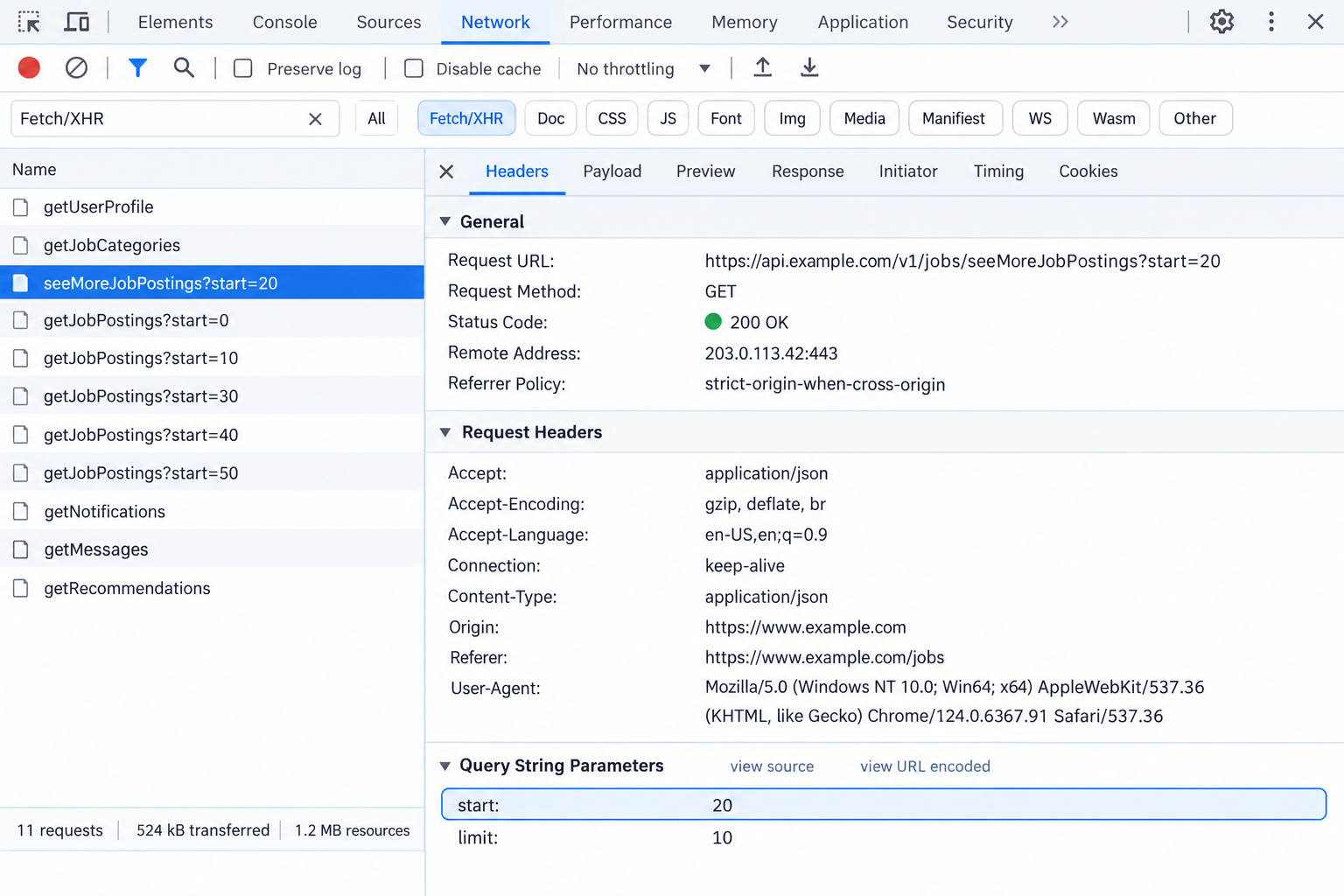
application/ld+json. Look for Person, Organization, or JobPosting objects. - Switch to the Network panel and filter by Fetch/XHR.
- Scroll a public jobs list. Watch for a
seeMoreJobPostingsrequest. This hidden API call usually carries astartoffset. - Use CSS selectors or XPath for fields missing from structured data.
Prefer JSON-LD over markup scraping. Class names change often, while schema fields stay readable longer. If the JSON block lacks a field, fall back to server-rendered HTML. For example, open a public job page, search the source for ld+json, and find a JobPosting block with title, hiringOrganization, and description. Record the exact request URL, payload, and field paths before building or scaling a parser. Also note whether the response is HTML or JSON, because parsing logic differs for each target. Save one working example for every page type you target. This prevents broken selectors when markup changes.
Step 3: Scrape Public Profile and Company Data from JSON-LD
Use parsel to fetch a public page and read its embedded JSON-LD block. The same approach works for the Person schema on public profiles and the Organization schema on company pages.
The parser should use an XPath rule to select every embedded data block. It then passes each block to json.loads. Keep the parsed object. If the response redirects to a sign-in page, raise an error. Do not save the wall page as a record.
Error handling matters because public pages omit many fields. Handle None values gracefully. A missing block usually means the URL is not public or the request was blocked. Slow down and retry later from a cleaner session. Do not collect private contact details.
The code below keeps the workflow small. This makes the mapper easy to debug. It fetches the target URL, checks for a login redirect, extracts a usable structured block, and returns plain fields. Replace the company mapping with profile fields such as jobTitle, worksFor and alumniOf when you parse a public profile. Test each URL in an incognito browser first. A saved login page will poison your dataset. It can also make the next run look noisier than it is.
For example, if you request Microsoft’s public company page, you can save the company name, industry, headcount range, headquarters and page URL to company.json.
import json
import requests
from parsel import Selector

HEADERS = {
    "User-Agent": "Mozilla/5.0",
    "Accept-Language": "en-US,en",
}

def fetch_page(url):
    response = requests.get(url, headers=HEADERS)
    # Проверка на редирект к странице логина или "стену авторизации"
    if response.url.endswith(("/login", "/authwall")):
        raise RuntimeError("Blocked: login redirect")

    response.raise_for_status()
    return Selector(response.text)

def first_json_ld(sel):
    xpath = "//script[@type='application/ld+json']/text()"
    for raw in sel.xpath(xpath).getall():
        try:
            return json.loads(raw)
        except json.JSONDecodeError:
            continue
    return None

def parse_company(url):
    sel = fetch_page(url)
    data = first_json_ld(sel)

    if not data:
        raise RuntimeError("No structured data found")

    return {
        "url": url,
        "name": data.get("name"),
        "industry": data.get("industry"),
        "employees": data.get("numberOfEmployees"),
        "address": data.get("address"),
    }
Sample output:
{
"url": "https://www.linkedin.com/company/microsoft",
"name": "Microsoft",
"industry": "Software Development",
"employees": "public headcount range",
"address": "Redmond, WA"
}
Company fields commonly available:
- Name and LinkedIn URL.
- Industry, description and website.
- Headcount range and headquarters location.
Public profile pages usually return a smaller set. Expect name, headline, location, current employer, education, and sometimes experience. When scraping LinkedIn data, treat absent fields as expected gaps, not parser failures.
Step 4: Scrape Public LinkedIn Jobs with the Guest Jobs Endpoint
You can scrape LinkedIn jobs without an account by using the guest search endpoint. Build a public search URL with keywords and location. Page through it with the start parameter. The seeMoreJobPostings endpoint returns HTML job cards. Competitors observed 10 results per offset. Verify the current page size before writing the loop.
Use this URL pattern: /jobs-guest/jobs/api/seeMoreJobPostings/search?keywords=Python%20Developer&location=United%20States&start=0. Treat pagination as a bounded loop. Increase start by the observed page size. Do not assume an endless feed.
For example, to collect 30 “Python Developer” postings in the United States over 3 pages, request start=0, start=10, and start=20. Parse the job cards for title, company, location, posted date, and job URL. Stop when the response has no cards or when a maximum page limit is reached. Store the scrape date because postings expire. Log the request offset so you can resume after an interruption.
search_url = base_search_url + "&start={start}"

for start in range(0, 30, page_size):
    html = fetch(search_url.format(start=start))
    cards = parse_job_cards(html)

    if not cards:
        break

    save(cards)
Then fetch each job page and read the JobPosting JSON-LD block. The description is HTML-encoded. Use HTML unescape before converting it to plain text. Also capture seniority and employment type when present. If the page redirects to login or lacks structured data, slow down or skip that record. Normalize line breaks and remove markup before saving. If a field is missing, store null instead of failing the whole run.
job = extract_structured_data(html, "JobPosting")

record = {
    "title": job.get("title"),
    "company": get_hiring_org(job),
    "employment_type": job.get("employmentType"),
    "description": html_unescape(job.get("description")),
    "scraped_at": now(),
}
Field | Example | Source |
|---|---|---|
Title | Data Engineer | Job card |
Employment type | Full-time | JobPosting |
Description | Plain text | Unescaped HTML |
Step 5: Add Delays, Retries and Human-Like Headers
A durable scraper must look boring. Send one or two requests at a time, reuse one realistic header set and cookie jar per session, and set a hard daily cap. Do not automate a personal logged-in account. Keep the same user-agent and accept-language across the whole run. Changing them mid-run can increase friction.
import random
import time

login_redirects = 0

def fetch(url, session, tries=3):
    global login_redirects

    for attempt in range(tries):
        # Случайная пауза между запросами для имитации поведения человека
        time.sleep(random.uniform(4, 9))

        resp = session.get(url)

        # Проверка на редирект к странице логина (часто означает блок)
        if "/login" in resp.url:
            login_redirects += 1
            if login_redirects >= 3:
                raise RuntimeError("Too many login redirects")

            # Длинная пауза перед повторной попыткой при редиректе
            time.sleep(60)
            continue

        # Обработка лимитов (429 Too Many Requests) или специфических ошибок (999)
        if resp.status_code in (429, 999):
            # Экспоненциальная задержка: 60с, 120с, 240с...
            time.sleep(60 * 2 ** attempt)
            continue

        return resp
For example, wait 4–9 seconds between requests, back off for 60 seconds after HTTP 429 or HTTP 999, and halt after three login redirects. Use exponential back-off, random delay, and low concurrency. Plain HTTP clients expose a non-browser TLS fingerprint, so stubborn pages may need Playwright or a TLS-impersonating client. If you move to a real browser, see Playwright with a proxy.
- Keep concurrency at one or two.
- Add jitter, not fixed pauses.
- Treat login redirects as a stop signal.
- Retry only when the response is safe to repeat.
Step 6: Clean, Validate and Export the Data
Raw LinkedIn data needs cleanup before analysis. Merge job rows from separate runs and deduplicate by job URL or posting ID. Export the final set to CSV, JSON or Excel, or push clean rows into a database or CRM. For example, three batches of Python Developer postings become one clean export with no duplicate URLs.
import pandas as pd

df = pd.read_json("jobs.json", lines=True)

df = df.drop_duplicates(subset="job_url")

df.to_csv("jobs.csv", index=False)
- Trim whitespace from names, titles and locations.
- Standardize dates and location values.
- Validate required fields and flag partial records.
- Review flagged rows before export.
- Add a
scraped_atdate and the source URL. - Set a data retention period and store only needed fields.
- Avoid keeping unnecessary personal details.
Save one fetched page for a snapshot test. It can catch selector breaks before the next run.
No-Code Option: Scraping LinkedIn with an Automation Tool
If you cannot maintain Python code, a no-code scraper can scrape LinkedIn data through a hosted workflow. Tools such as PhantomBuster-style automations act through your logged-in account, so ToS and ban risk are higher than with public-page collection.
- Pick a tool and a pre-built LinkedIn scraper.
- Provide input: search URLs, profile URLs, a spreadsheet, or a CRM list.
- Connect the LinkedIn session with a browser extension or session cookie.
- Add email enrichment only if you have a lawful reason.
- Set conservative daily limits and account warm-up rules, then increase slowly.
- Schedule launches, review output, and export CSV or JSON.
These tools can break when LinkedIn UI changes, and limits depend on account age and type. Verify current pricing on the vendor site before committing. Treat these as unofficial rules of thumb, not safe ceilings. If a launch fails, stop and reduce volume.
For example, a sales rep needing 150 profiles should export 20–30 per launch over several days, not one large batch.
Account type | Profiles per day | Search pages per day |
|---|---|---|
New | ~80 | Avoid batched searches |
Active free | ~150 | Keep low |
Premium | ~300 | Keep low |
Scaling Up Without Blocks: IP Quality, Sessions and Proxies
Once your LinkedIn scraping passes a few dozen requests, IP reputation matters more than parsing. Datacenter proxies are the easiest to flag. Residential options look more natural. Mobile proxies sit behind carrier-grade NAT (CGNAT), so one address can represent many real phones. That makes individual requests resemble ordinary phone traffic. For carrier-based setups, review mobile proxies for LinkedIn. The site can throttle or block weak sources quickly.
- Bind each task to one connection identity.
- Keep a sticky session across pagination, then change it between tasks.
- Match geography to the listing set you need.
- Keep request rates low even when the address looks clean.
- Do not treat IP rotation as permission to collect non-public pages.
For example, a researcher collecting job postings for several countries can run each country batch from a separate sticky session. Rotating on every request can break the start offset flow and produce inconsistent pages. Proxies hide your origin but do not clean a bad request pattern. No address type guarantees zero blocks.
proxy_url = "http://user:pass@host:port"
response = requests.get(
url,
proxies={
"http": proxy_url,
"https": proxy_url
}
)
browser = p.chromium.launch(
proxy={
"server": "http://host:port",
"username": "user",
"password": "pass"
}
)
Why mobile IPs fit sensitive targets
OnlineProxy provides mobile proxies on real 4G/5G carrier IPs through modems and SIM routers, authenticated with username and password over HTTP or SOCKS5. For Chromium or Playwright scrapers, use an HTTP proxy with credentials because Chrome cannot send SOCKS5 credentials. A dedicated option supports sticky sessions with IP change on demand or by timer.
Common LinkedIn Scraping Mistakes and What They Cost You
For example, if a team saves setup time with a sales director’s logged-in account, a restriction can halt Sales Navigator. The group may then rebuild lead lists during a campaign. The price is usually lost access, bad records, or unexpected legal review.
Mistake | Consequence | Fix |
|---|---|---|
Automating a personal profile | Account ban, lost network, broken outreach. | Use public pages or approved access only. |
No delay between requests | Rate blocks, poisoned IPs, junk responses. | Add jitter, low concurrency, back-off. |
Brittle selectors | Parsers fail when classes change. | Prefer JSON-LD and validate output. |
Ignoring status codes | Login redirect HTML saved as records, hurting data quality. | Stop on authwall or error responses. |
Keeping excess PII | GDPR exposure and retention risk. | Store needed fields, set deletion dates. |
Chasing non-public pages | Higher legal and enforcement risk. | Limit collection to guest-visible content. |
Troubleshooting: Login Redirects, 429/999 Errors and Empty Results
Use a fixed order while debugging: confirm the page is public, inspect saved HTML, then check status and IP behavior.
Record each raw HTTP response, because patterns distinguish a block from normal data expiry.
Symptom | Likely cause | What to do |
|---|---|---|
Redirect to /login or /authwall | Non-public page or blocked session | Verify the URL in incognito, slow down, and change the IP or session. |
HTTP 429 or HTTP 999 | Rate limiting or poor IP reputation | Back off, reduce concurrency, and check your IP reputation. |
JSON-LD missing | Markup changed or a block page was saved | Inspect the stored HTML and update the selector. |
Empty response at a high start offset | Pagination limit or end of guest results | Stop paging. Treat this as completion, not failure. |
Partial fields | Data is not public | Accept None and keep only available fields. |
Different results between runs | Postings expire or profiles change | Refetch and store a scrape date. |
For example, zero job cards after page 3 can mean the guest feed ended, not that your requests were actually blocked.
FAQ: Scraping LinkedIn Data
Is it legal to scrape LinkedIn?
Public pages may be accessible, but the platform’s User Agreement restricts automated collection. Privacy laws can still apply to personal data. Limit yourself to public fields, keep a lawful purpose, and check local rules before use. This is not legal advice.
Can I scrape LinkedIn without an account?
Yes, guest access works for limited public content such as company pages, job postings, and some profiles. Account-free scraping still misses people search, employee lists, and most member details. Treat the sign-in wall as a clear boundary, not a technical hurdle to simply bypass.
Does LinkedIn have an official API for this?
Official routes exist, but they are partner-gated and restricted. They usually cover approved products, not broad public profile or job extraction. If you need compliant access, apply through the relevant program before building and respect its scope and rate limits.
How many profiles can I scrape per day?
There is no safe fixed number. The limit depends on the method, content type, request timing, IP reputation, and account status. Start with a small batch, watch for redirects, errors, or unexpected empty pages, and stop immediately if the flow changes.
Can I use Puppeteer or Playwright alone?
They render pages and can imitate browser behavior, but they do not remove block risk. You still need realistic pacing, headers, navigation flow, and clean IPs. Avoid automating a logged-in personal profile unless you are prepared to accept account restrictions.
How to scrape LinkedIn without getting blocked?
Keep requests slow, random, and low in volume. Read only public pages, handle login redirects, and use clean IPs with stable sessions. Do not automate a logged-in account, because that quickly raises both enforcement and data-quality problems for your project.
Conclusion: A Safe Way to Scrape LinkedIn Data
Safe LinkedIn scraping limits itself to public data and avoids logged-in automation. Choose code, a no-code tool, or an official API based on your skill and volume. Prefer JSON-LD and guest job endpoints over fragile page classes. Apply rate limiting, use clean sessions, and follow data protection rules for personal fields.
Next steps
- Pick one dataset. Start with public job pages for one role and location.
- Run a 20-record pilot. Review missing fields, duplicates, redirects, source URLs, and scrape dates.
- Scale gradually. Re-test parsers often, because markup and endpoints change. Delete records you do not need.