- All proxies are mobile, clean, anonymous, and highly trustworthy.
- Mobile proxies can be used in any software; below you'll find the most popular ones.













Proxies for Backlink Analysis and Bulk Backlink Checking
- Sean Porter
- 8 minutes
Proxies for backlink analysis use a proxy server to keep large checks from failing. When a bulk backlink checker requests thousands of referring domains from one IP, sites and search engines apply rate limiting. They serve CAPTCHA walls or return HTTP 429 and 403. This proxy for bulk backlink checker tasks sits between the tool and target, spreading requests across multiple IPs. About 20% of webmasters remove external links within a year, so large status checks are common.
For example, if an agency checks 3,000 exported links from one office IP, after a few hundred requests many responses may show:
- CAPTCHA wall
- 429 Too Many Requests
- Empty results
- IP ban
External link-index APIs do not need your proxies. Self-run checkers, crawlers, and scripts do. These proxies for backlinks support analysis and monitoring, not link spam.
How a Proxy for a Bulk Backlink Checker Works
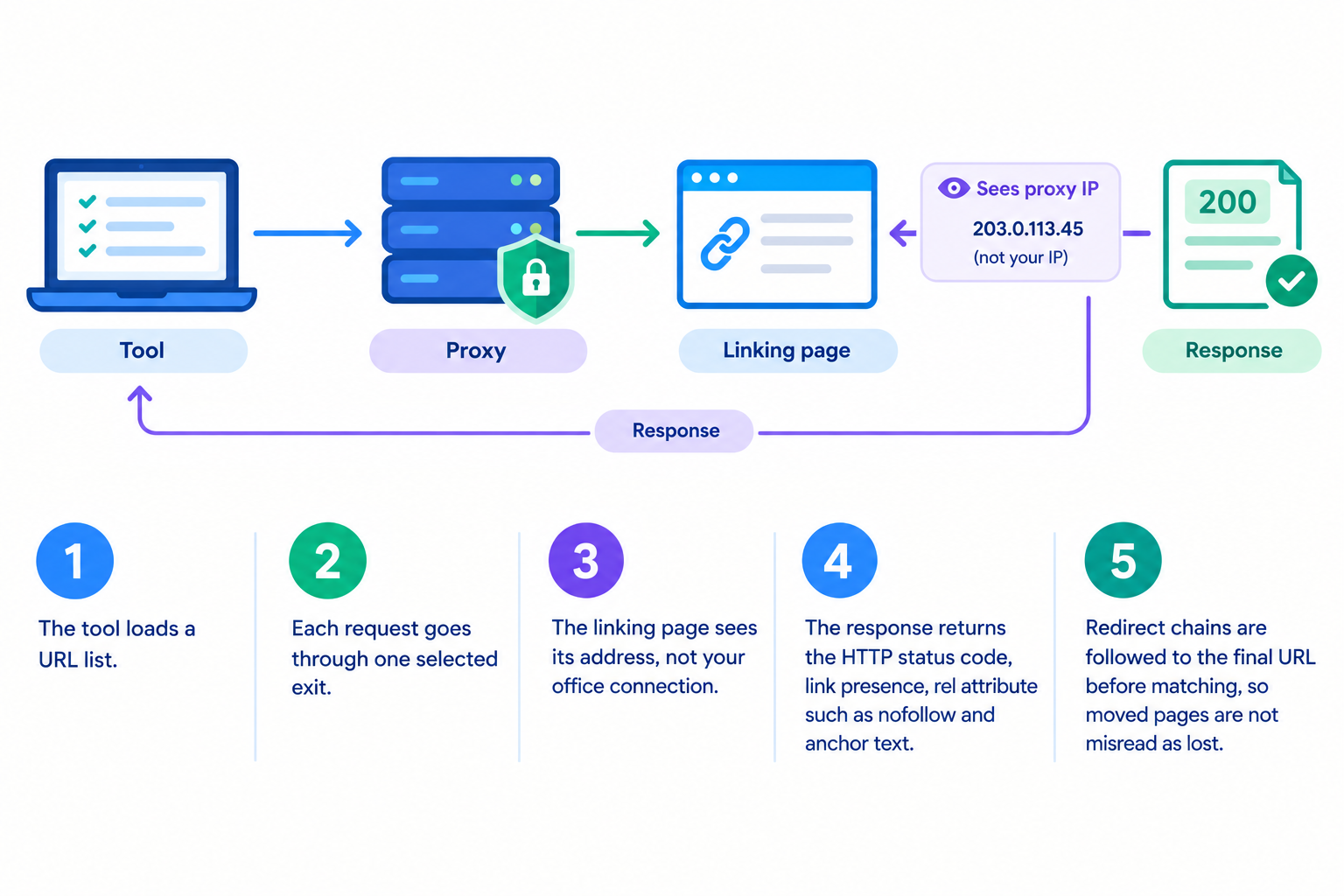
A proxy for bulk backlink checker traffic sits between your auditing tool and each linking page. The intermediary forwards the request, so the destination sees a different address instead of yours. This keeps one endpoint from collecting every refusal.
- The tool loads a URL list.
- Each request goes through one selected exit.
- The linking page sees its address, not your office connection.
- The response returns the HTTP status code, link presence, rel attribute such as nofollow and anchor text.
- Redirect chains are followed to the final URL before matching, so moved pages are not misread as lost.
HEAD requests fetch headers only, speeding status checks.
With a 5,000-link export, ten addresses and matching threads can split the work. Each handles about 500 requests with delays, rather than one endpoint sending 5,000. Concurrent connections save hours on large audits.
The setup does not make a bulk backlink checker invisible. Pacing, headers, user-agent and retries still decide whether results are clean.
Main Use Cases for Proxies in Backlink Analysis
Proxies for backlinks support four practical jobs. They cover link-status checks in a backlink audit, ongoing link monitoring, index check runs, geo-targeting views, and competitor backlink research. The summary table after the subsections compares each task.
Checking Whether Backlinks Are Still Live
A bulk backlink checker verifies link status, but repeated automated hits can trigger rate limits. Rotating IPs and sensible delays keep data clean. For example, a monthly check of 1,200 guest-post links can mistake blocked pages for lost links. That causes wrong decisions.
- HTTP status: 200, 301 redirect, or 404.
- Link presence: the anchor text is still present.
- Rel attribute: nofollow or other changes.
Checking Link Indexation
Indexation checks use site: search operators, and repeated SERP queries can trigger CAPTCHA quickly. Proxies for backlink analysis spread those queries. Since a page must be indexed to pass link equity, treat results as indicative, not absolute.
- Collect linking URLs.
- Check indexing through proxies with delays.
- Flag non-indexed pages.
- Review crawlability, quality, and internal links first.
If 15% of 800 new links are unindexed, investigate before outreach.
Viewing Links and SERPs From Different Regions
For local SEO, a 2025 study, Balancing Security and Privacy, notes routing traffic through proxies can simulate requests from diverse geographical locations. This exposes geo-targeting and geo-blocked content. Backlinks stay the same. Only access and local SERP results may change. For example, viewing a German news site that links to a client through a German IP shows whether it is accessible and shown locally. First check the proxy's IP location.
Researching Competitor Backlink Profiles
For competitor analysis, crawl 300 public pages linking to three rivals for link gap prospecting. Proxies for backlinks keep your IP unblocked. Respect robots.txt and terms. See proxy setup for crawling.
Task | What breaks without a proxy | What the proxy should provide |
|---|---|---|
Link status | Blocked results | Rotating IPs |
Indexation | Search CAPTCHAs | Slower pacing |
Regional views | Geo-blocked pages | Local IP |
Competitor research | Crawl bans | Separate IPs |
Which Proxy Type Works Best for Bulk Backlink Checking?
Proxies for backlink analysis differ by IP source. Datacenter options come from cloud providers. Residential addresses come from homes. Mobile proxies use a 4G/5G carrier IP, so requests look like phone traffic.
By choosing datacenter proxies for speed, you accept higher blocking odds. Balancing Security and Privacy (2025) calls them cheaper but easier to detect. Residential routes lower risk but run slower. Mobile IPs are most trusted, but fit sensitive jobs better than mass crawls.
Proxy type | Speed | Trust level on strict sites | Best backlink task | Main trade-off |
|---|---|---|---|---|
Datacenter proxies | High | Lower | Big status checks | Easier to flag |
Residential proxies | Medium | Higher | Broad audits | Slower |
Mobile proxies | Medium | Highest | Index checks | Poor for mass crawling |
A rotating proxy changes IPs between requests. A sticky session keeps one address for consistent visits. HTTP is the safe default. SOCKS5 requires tool-side credential support.
For example, an agency may run a 20,000-URL status check on datacenter routes, then move CAPTCHA-hit index checks to mobile IPs.
OnlineProxy supplies mobile proxies on real 4G/5G carrier IPs through modems and SIM routers. They support HTTP and SOCKS5 with username and password authentication.
Which should I pick?
- Use datacenter routes for big tolerant targets.
- Use mobile IPs for index checks and CAPTCHAs.
- Match the proxy for bulk backlink checker to target tolerance.
How to Set Up Proxies in a Bulk Backlink Checker
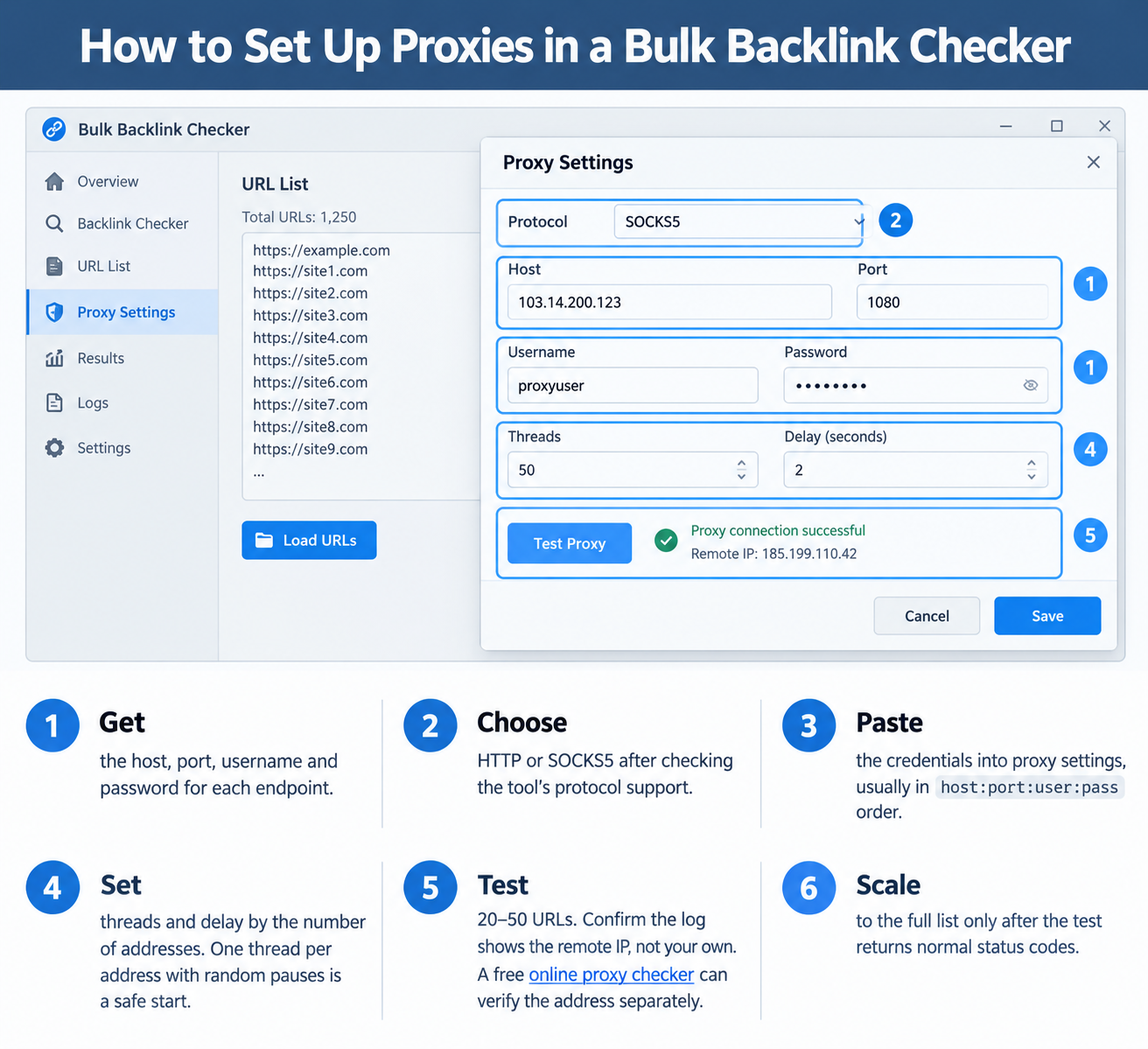
Configure a proxy for bulk backlink checker use before loading a large URL list. Most desktop tools and scripts accept one address per line.
- Get the host, port, username and password for each endpoint.
- Choose HTTP or SOCKS5 after checking the tool’s protocol support.
- Paste the credentials into proxy settings, usually in
host:port:user:passorder. - Set threads and delay by the number of addresses. One thread per address with random pauses is a safe start.
- Test 20–50 URLs. Confirm the log shows the remote IP, not your own. A free online proxy checker can verify the address separately.
- Scale to the full list only after the test returns normal status codes.
host:port:username:password
For example, if a freelancer adds 10 endpoints and runs a 30-URL test batch, the bulk backlink checker log should show different IPs. Only then should they load 4,000 URLs. This catches format errors before a long run.
Keep the test batch small enough to inspect manually. If every request fails with the same authentication error, the tool probably received the wrong protocol or credential order.
Chrome cannot send SOCKS5 credentials. Use an HTTP proxy with login/password, and Chrome shows a sign-in prompt, or route SOCKS5 through Proxifier, a local forwarder or an anti-detect browser.
Best Practices to Avoid Blocks and Bad Data
Proxies for backlink analysis work with controlled request behavior.
- Throttle requests. Rate limits are usually counted per IP address, so add random delays.
- Match concurrency to proxies. One thread per connection is safer than many hits.
- Choose rotation deliberately. Rotate for search queries. Keep a sticky session where cookies matter.
- Verify failures. Retry a 429 after the indicated delay, using another proxy before marking a link lost.
- Deduplicate first. Check each domain once per run to avoid repeats.
- Respect rules. Follow robots.txt and site terms.
- Log response codes. Separate 403, 404, 429 and timeouts before reporting results.
Troubleshooting Proxy Problems in Backlink Checkers
A password typo can produce HTTP 407 on every request. A 20-URL test batch catches it before the bulk backlink checker runs the full list.
Symptom | Likely cause | Fix |
|---|---|---|
HTTP 403 or HTTP 429 | Too many requests or blocked IP. | Lower threads, add delays, change IP. |
CAPTCHAs during search queries | Too many searches from one address. | Rotate IPs, add delays. |
HTTP 407 | Proxy authentication failed: bad username, password, or format. | Re-enter credentials, check the proxy string. |
Timeouts or slow checks | Overloaded proxy or too many threads. | Reduce threads, test one URL, switch protocol. |
Tool differs from browser | Different headers, cookies, IP, or user-agent. | Compare one URL manually, match request settings. |
FAQ: Proxies for Backlink Analysis
Do I always need proxies for backlink analysis?
No. A small audit of 200 URLs may work from one IP. A 20,000-URL monthly run almost certainly needs a proxy pool.
How many proxies do I need for a bulk check?
Match the pool to your thread count and target limits. Enough IPs should keep each one below the site’s request threshold.
Should I use a rotating proxy or a sticky session?
Use rotation for search queries and broad checks. Use a sticky session when a site expects consistent visits during one check.
Are free proxies for backlinks safe?
They are risky. Paid proxies generally offer fresher IPs, higher uptime, and an accountable provider.
Is it legal to use proxies for backlink research?
Usually yes for public pages. Still, follow each site’s terms of service, robots.txt, and copyright rules.
Conclusion: Make Backlink Data Reliable at Scale
Proxies for backlink analysis reduce blocks, CAPTCHAs, and skewed regional results by spreading requests across separate IPs. The right proxy type, request pacing, and a small test batch determine whether you get reliable data.