- All proxies are mobile, clean, anonymous, and highly trustworthy.
- Mobile proxies can be used in any software; below you'll find the most popular ones.













Proxy for TikTok: What It Is, Why Use One and How to Set It Up
- Kevin Brinn
- 12 minutes
What Is a Proxy for TikTok ?
A proxy for TikTok is an intermediary proxy server that routes your TikTok app or TikTok web traffic through a different IP address.
The platform then reads this new identity, approximate geolocation, and carrier network type instead of your home or office connection. That information can shape the initial feed and regional results. Account data and device identifiers remain visible. The change affects only the network layer itself.
A TikTok proxy still does not fix everything. It does not replace account hygiene. It does not hide device fingerprints alone. It is not a VPN with system-wide encryption by default.
- Proxy: routes one app or browser session through a chosen endpoint.
- VPN: usually encrypts all device traffic and changes the system route.
For example, a social media manager in Berlin can open TikTok through a Spanish IP. The platform then sees a Spanish connection, not the German office network.
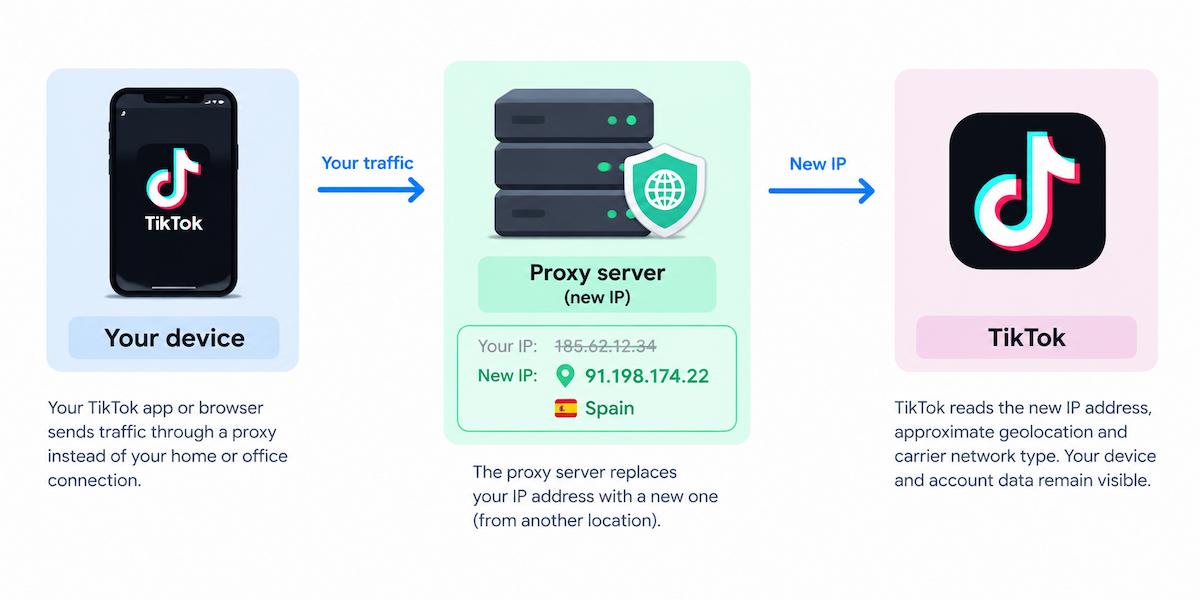
Setup depends on two common formats. An HTTP proxy works with browser credential prompts, while the SOCKS5 proxy option needs software that can send username and password.
Why Use a Proxy for TikTok?
- Separate IPs for accounts
- Regional research
- Ad and campaign testing
- Network privacy
Why use a proxy for TikTok? It solves these four problems by giving each session a different IP address, protecting reputation, and supporting account management. It remains a tool, not a guarantee. Always follow TikTok terms of service and local laws.
Managing Multiple TikTok Accounts Without Sharing One IP
In multi-account management, several profiles logging in from one address can look like a cluster. That pattern may trigger extra verification, limits, or account linking. A separate proxy for TikTok accounts gives each one a stable network identity and protects IP reputation.
The safest rule is simple: one profile, one address. Keep it consistent. Frequent switching looks more suspicious than a steady connection.
- Agencies
- Community managers
- Brands with regional accounts
For example, an agency managing eight client TikTok profiles can assign each one its own proxy and browser profile. Logins then appear from separate networks instead of one office network. This reduces one risk signal, but it does not make poor behavior safe.
Accessing Region-Specific Content and Trends
TikTok shapes the regional feed, For You page, trending sounds, ads, and TikTok Shop visibility by location. A proxy for TikTok can route research traffic through an IP in a target market. Marketers can then observe what local users see. This supports market research and geo-targeting, but it does not guarantee access to restricted or unavailable features. Always respect TikTok’s rules and local law. It is most useful for comparing creative styles, hashtag demand, and shopping cues before launch.
Research use case: An e-commerce brand in Poland checks which product hashtags trend with TikTok users in another market before planning a campaign.
Testing Content, Ads and Localized Campaigns
Marketers use a proxy for TikTok to preview content and TikTok Ads as if the request came from another location. This supports campaign QA and localization before ad delivery starts.
- Caption language and regional spelling.
- Ad creative, offer, and age or region gating.
- Link destination and landing page language.
- Shipping info, currency, and local availability.
It also reveals whether the landing page loads with the right tracking parameters and without regional redirects.
For example, a performance marketer checks that a localized ad creative and its link open correctly from the target city’s network. That TikTok ad verification step catches mismatches before users do.
Privacy and Network Flexibility
A proxy gives privacy through IP masking. TikTok sees the proxy IP, not your real connection. It does not make you anonymous. The platform still links activity to your login, device identifiers, cookies and account data.
- Your real IP address
- The network your device uses
- Rough location tied to that IP
- Account data and login history
- Device identifiers and browser fingerprints
- Content you post or watch
For network flexibility, keep work traffic separate from personal traffic. For example, a creator on a shared co-working network can route TikTok sessions through one proxy while personal browsing uses the normal office IP.
Which Type of Proxy Works Best for TikTok?
The best proxy for TikTok depends on how realistic the IP looks and how stable your workflow needs it to be. The platform is mobile-first, so a 4G/5G carrier IP usually resembles normal phone traffic. A datacenter proxy is faster and cheaper, but it clearly comes from a non-consumer network.
Proxy type | How the IP looks to TikTok | Typical strengths | Main limitations | Best for |
|---|---|---|---|---|
Datacenter proxy | Hosting network IP | Cheap, fast, easy to scale | Easy to recognize and flag | Bulk research where realism is not critical |
Residential proxy | Home broadband IP | Middle ground, broader locations | Variable speed and quality | General browsing and regional checks |
Mobile (4G/5G) | Carrier IP from a phone network | Closest to normal TikTok app traffic | Higher cost, speed depends on carrier | Logged-in accounts and realistic testing |
The core trade-off is simple. By choosing datacenter addresses for speed and low cost, you accept a higher chance of extra checks. By choosing a mobile proxy for TikTok, you gain realism but accept higher cost and carrier-dependent speed. Residential access sits between these two.
For account work, prefer a sticky session. It keeps the account on one stable endpoint, so logins do not jump around. A rotating proxy is better for short research tasks, because IP rotation spreads requests across many addresses. For example, a manager running five long-lived brand accounts uses stable mobile endpoints with sticky sessions. An analyst checking public trend pages for a day uses rotating addresses.
OnlineProxy offers mobile proxies on real 4G/5G carrier IPs through modems and SIM routers, not smartphones. Access uses username and password authentication, with HTTP and SOCKS5 options. Dedicated mobile setups can keep a sticky session and change the IP when needed.
How to Use a Proxy for TikTok: Step-by-Step Setup
The basics of how to use a proxy for TikTok depend on your access point. Setup differs for the phone app, desktop browser, and an isolated profile. Every step below assumes a proxy host, port, username, and password. Use HTTP proxy or SOCKS5 details exactly as provided. Login and password authentication is required. These steps never rely on IP whitelisting.
Before You Start: What You Need
Prepare these details before touching any settings or logging in:
- Proxy credentials: host, port, username and password. Keep them together. Example format:
proxy.example.com:8080:manager01:fakepass123. - Protocol: HTTP with login/password works directly in browsers and iOS manual settings. SOCKS5 requires a tool that supports SOCKS5 authentication.
- Chrome limitation: it cannot send SOCKS5 credentials. Use an HTTP proxy there.
- Account map: record which TikTok account uses which proxy, protocol and port. A spreadsheet is enough. Include the expected country or carrier. Example: Account A uses Proxy 1. Account B uses Proxy 2.
- Separated environment: create a fresh browser profile or app environment for each account. Match language and timezone where possible. Do not mix cookies or sessions.
Set Up a Proxy for TikTok on iPhone
This iOS method sends HTTP credentials directly in Wi-Fi settings. To configure a proxy for TikTok on iPhone, open Settings > Wi-Fi and tap the information icon beside the current network.
The steps take about a minute.
- Tap Configure Proxy and select Manual.
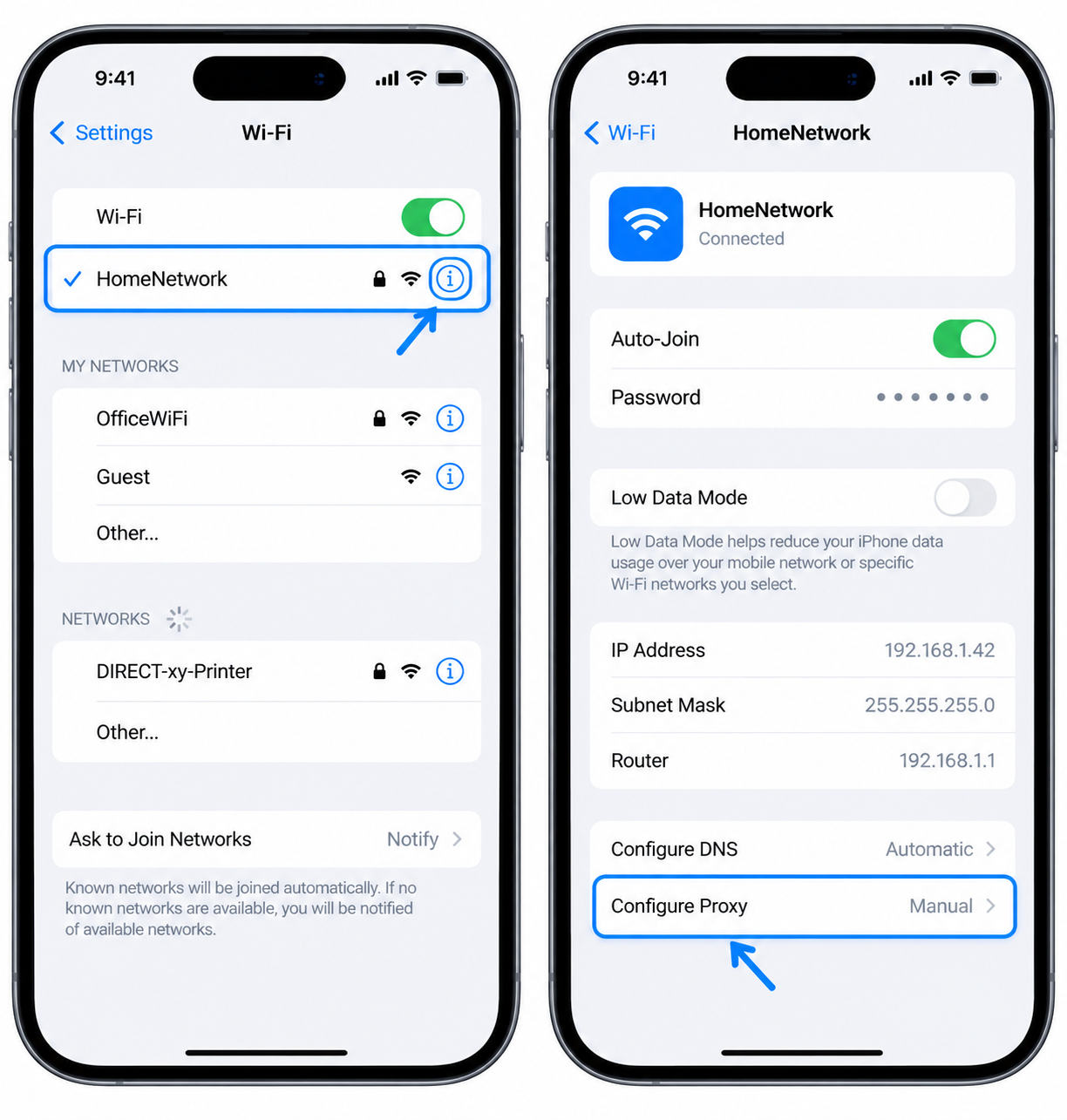
- Enter the Server and Port.
- Turn on Authentication and enter the username and password.
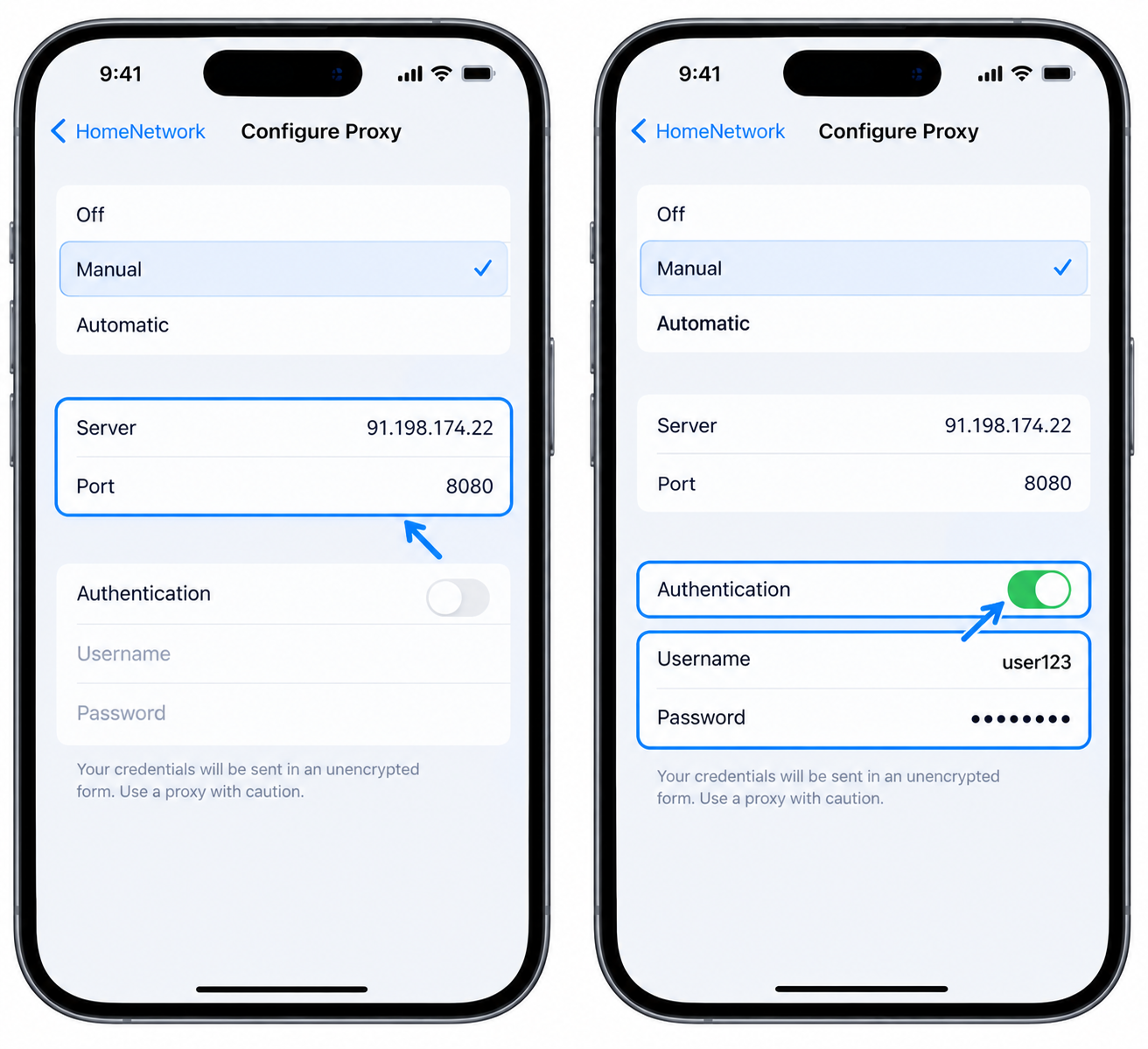
- Tap Save, then reopen TikTok.
For example, a creator on home Wi-Fi can save the settings and open TikTok. They can then confirm the new location on an IP check page in Safari. Do this before logging into TikTok.
SOCKS5 and per-app routing need a dedicated proxy client app with authentication support.
Set Up a Proxy for TikTok on Android
Android’s built-in Wi-Fi proxy field can handle a basic HTTP route, but it is often too limited for authentication. Open Settings, choose the saved wireless connection, open Advanced options, select Manual, then enter host and port. This change affects only that network, not mobile data.
For a proxy for TikTok on Android, use a dedicated proxy client app that supports HTTP or SOCKS5 credentials. Use per-app routing so only the chosen social service goes through the selected route. Then:
- Install it.
- Add a profile with host, port, protocol, username, and password.
- Enable it.
- Open TikTok.
For example, a manager with a dedicated Android test phone adds one profile for one account, checks an IP page, then logs in.
Use a Proxy for TikTok in a Desktop Browser
- On Windows, open Settings > Network & Internet > Proxy and turn on Use a proxy server.
- Enter the HTTP host and port. This field is HTTP-only.
- Launch a fresh Chrome profile and load TikTok web.
- A credential prompt appears for the login and password.
For example, a marketer opens a separate Chrome profile, applies the HTTP proxy through Windows proxy settings, and logs in to TikTok web. That prompt confirms the credentials reached the browser. It is usually the simplest TikTok proxy in Chrome workflow.
SOCKS5 limitation: This browser cannot send SOCKS5 username/password through system settings, the --proxy-server flag, or a browser extension.
If your connection uses SOCKS5:
- Route it through a local forwarder, Proxifier, or an anti-detect browser that supports SOCKS5 authentication.
- If you use
--proxy-server, quit Chrome completely first or add--user-data-dirso the flag applies to a fresh profile. - Firefox follows system settings by default, but its configuration also does not accept SOCKS5 credentials.
- A typical proxy extension can store profiles, yet it cannot supply authentication details.
Run Multiple TikTok Accounts with Separate Browser Profiles
For a proxy for multiple TikTok accounts, give each account one isolated browser profile or anti-detect browser environment. Bind it to one endpoint. Keep its language and timezone aligned with that connection’s region. This keeps cookies, sessions, and account mapping separate.
Three regional brand accounts can each run in their own workspace. Each setup uses a matching region, language, and timezone. SOCKS5 with authentication is practical here because anti-detect browsers can store credentials. Do not share these environments between accounts. A stable mapping looks more predictable than frequent switching. Changing endpoints mid-session can create inconsistent location signals. It can also force repeated logins or extra verification.
Account | Browser profile | Proxy | Region/timezone |
|---|---|---|---|
Brand EU | Profile-EU | Proxy-1 | Europe / CET |
Brand UK | Profile-UK | Proxy-2 | UK / GMT |
Brand US | Profile-US | Proxy-3 | US / EST |
Check That Your TikTok Proxy Is Working
Run a connection test before opening the account or app.
- Open an IP check page through the same proxy.
- Confirm the IP address, location, and ISP changed to the expected proxy network.
- Check that the page does not show your real DNS or local network details.
- Open TikTok only after this result matches the target region.
For example, if you expect a mobile carrier in Spain, the checker should show a Spanish carrier before you log in. If it still shows your office ISP, fix the proxy settings before continuing. Do not log in until the check passes.
Best Practices for Using a Proxy with TikTok
No proxy for TikTok guarantees account safety. Good habits reduce visible risk signals. If these rules are ignored, the platform may respond with extra verification, restricted reach, or lost access. Consistency matters more than clever masking.
- Use one account per IP. Many unrelated logins from one exit point can look like a farm and invite review.
- Keep IP and region consistent. A stable location supports a normal account history and reduces takeover checks.
- Avoid frequent IP jumps. Rapid changes can look like stolen access or abusive automation.
- Match language and timezone. Conflicting signals make sessions look spoofed even when the IP is clean.
- Practice account warm-up for new profiles. Normal watching, posting and engagement builds trust before heavier work.
- Keep automation conservative. A high rate of activity can trigger limits, verification or reduced reach.
- Follow TikTok Community Guidelines and local law. Rule-breaking can cause restrictions or permanent loss of access.
Troubleshooting: TikTok Proxy Not Working
If you see the TikTok proxy not working error, check the connection path. Start with credentials, protocol, port, and cache. For example, Chrome repeatedly shows a sign-in prompt because SOCKS5 was entered there. Switch to HTTP with login and password.
Symptom | Likely cause | Fix |
|---|---|---|
TikTok app shows a network error | Protocol mismatch, bad credentials, or a Wi-Fi-only setting while the phone uses mobile data. | Verify host, port, login, and active connection. |
Browser keeps requesting credentials | Incorrect login/password or SOCKS5 in Chrome. | Switch to HTTP authentication. |
IP still shows the old location | Chrome was already running when --proxy-server was used. | Close the browser completely or launch a separate profile. |
Speed is poor | Carrier network load or weak signal. | Try another IP, location, or time. |
TikTok shows the wrong region | Stored session, mismatched language, timezone, or DNS clues. | Clear cache, align device locale, and retest. |
If the connection itself still fails, contact your provider's support with the protocol, port, and exact error message.
Proxy for TikTok: Frequently Asked Questions
Is using a proxy for TikTok legal?
It is generally legal in many places for ordinary users. You still must follow TikTok's terms, local laws, and any regional platform rules. Do not use it for abuse, fraud, or evasion of legal obligations.
Can a proxy for TikTok get my account banned?
It does not cause a ban by itself or create instant risk. Poor-quality IPs, shared IPs, erratic logins, or misuse can increase the risk of restrictions. Stable, realistic behavior is safer than frequent location jumps on logged-in accounts.
Do I need a proxy for one TikTok account?
A single profile usually does not need one. Normal browsing is fine without it. It becomes useful for several accounts, regional research, or separated work and personal sessions.
Is a free proxy good enough?
Free public proxies are often slow, shared, and unreliable for account use. They may also be unsafe for logged-in sessions. Avoid them for account work or repeated logins because quality is unpredictable.
HTTP or SOCKS5: which is better for TikTok?
HTTP with login and password is the simplest option in browsers. SOCKS5 can work, but it needs a tool that supports authentication with credentials. Choose the protocol your client can authenticate with reliably for TikTok.
Conclusion: Using a Proxy for TikTok the Right Way
A proxy for TikTok routes app or web traffic through another IP address. Teams use it for separate login identities, regional testing, and cleaner network privacy. The setup rules matter: choose the right proxy type, use the protocol the device supports, and keep one account on one stable IP.
- Match mobile, residential, or datacenter options to the task.
- Configure the connection, then verify the IP before login.
- Maintain consistency in region, profile, and behavior per account.