- All proxies are mobile, clean, anonymous, and highly trustworthy.
- Mobile proxies can be used in any software; below you'll find the most popular ones.





Performance Boost via Residential Proxy
- Kevin Brinn
- 13 minutes
The reason why businesses use residential proxies is simple. Websites treat traffic differently by source. Datacenter proxies often face blocks, altered content, or skewed prices. A residential IP makes traffic look like an ordinary local customer. For example, a retailer may see one competitor price from its office. Shoppers in another city may see another, and residential IPs reveal that number. Geo-targeting makes these checks precise. That is how businesses use residential proxies to collect accurate public web data, verify the real user view, and scale research.
- Definition: an intermediary route using ISP-assigned home IPs.
- Use cases: scraping, price monitoring, ad checks, SEO, geo-testing.
- Types: rotating, static, dedicated, shared, and mobile options.
- Comparison: residential beats datacenter where anti-bot systems distrust servers.
- Legality: depends on the task, site terms, and IP sourcing.
- Trade-offs: usually higher cost and slower speeds than datacenter proxies.
What Is a Residential Proxy, in Business Terms
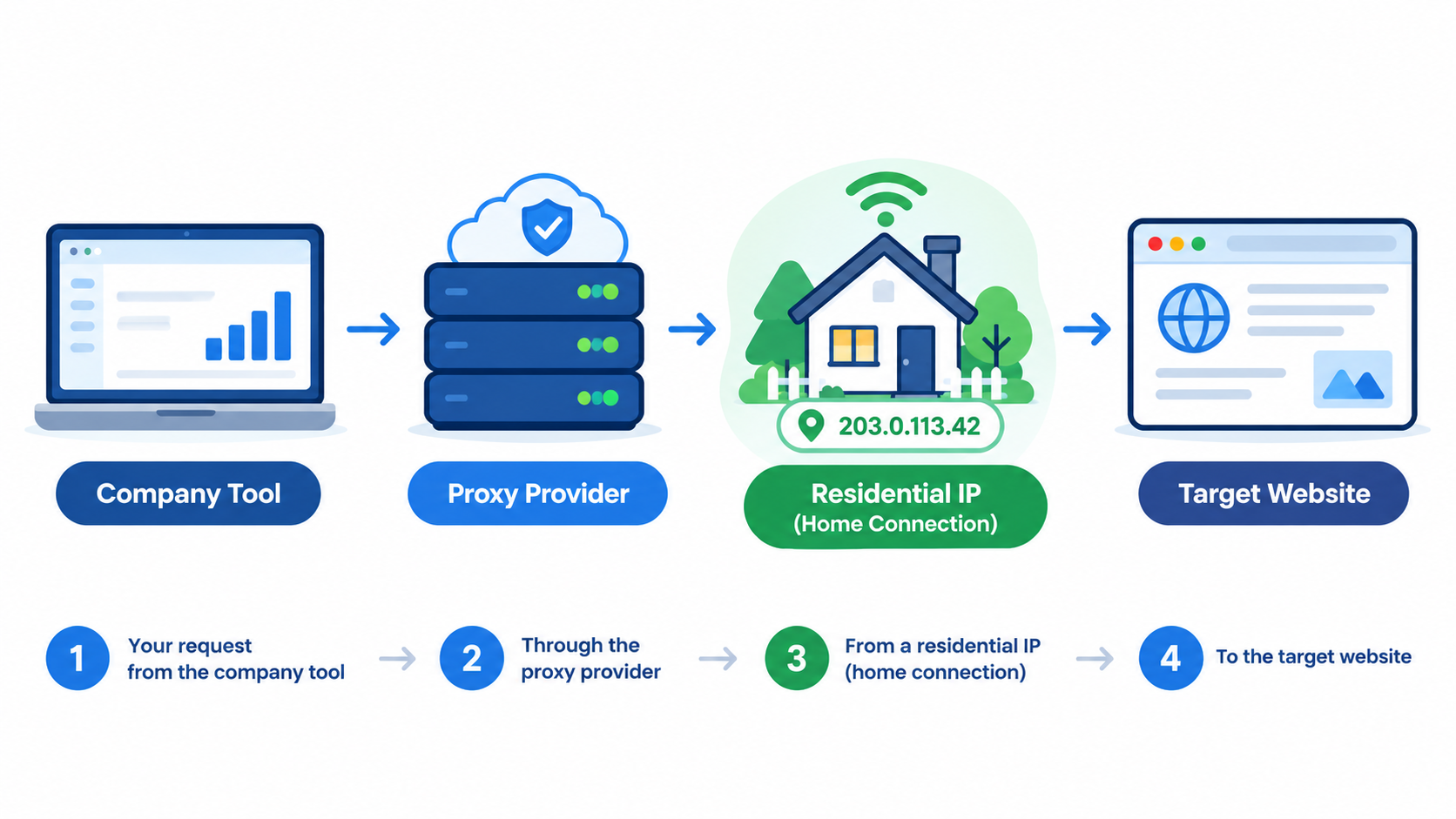
A residential proxy is an intermediary server for business requests. Businesses use residential proxies to route those requests through a residential IP assigned by an ISP to a household connection. The target website then sees an ordinary home user, not a server. It is like sending a letter through a local friend's address. The recipient sees a local postmark. That local signal matters when a page changes by region.
- The company's tool sends the request to the provider's network.
- That network directs it to a residential IP on a household connection.
- The target website replies to that home-looking address.
Websites give ISP-issued addresses more trust because they belong to real paying homes. Server ranges have a datacenter history and weaker IP reputation. Anti-bot systems therefore challenge them more often. This trust is practical, not magical. It helps legitimate tools see customer-facing content.
The proxy masks the IP and location only. It does not hide cookies, browser fingerprint details, or behavior. Teams still need sensible automation settings. Random pacing and consistent headers reduce obvious bot patterns. This keeps results closer to real customer views. That lowers the chance of distorted or blocked data.
Why Businesses Choose Residential Over Datacenter Proxies
Businesses choose residential proxies when the target treats server traffic differently. Datacenter addresses are fast and inexpensive. Their ranges belong to hosting providers, so anti-bot systems can flag them quickly. Residential addresses come from home connections, so sites usually trust them more. That trust buys fewer blocks and more accurate local content. The trade-off is direct: you sacrifice speed and budget to gain reliability and location accuracy. For simple pages with weak protection, cheaper server IPs are often enough. For strict marketplaces, localized prices, or bot detection, home-based connections become necessary.
For example, a price-comparison startup may crawl a small regional shop with datacenter addresses. If a large marketplace blocks those server ranges, the same team moves to residential options. The target changes, so the proxy choice changes.
Feature | Residential proxies | Datacenter proxies |
|---|---|---|
IP origin | Home connections assigned by ISPs | Server ranges owned by hosting providers |
Detection risk | Lower where IP reputation matters | Higher where anti-bot rules are strict |
Speed | Variable, depending on household links | Usually faster and more stable |
Cost | Higher | Lower |
Location accuracy | Stronger for local pricing and content | Weaker unless location is less important |
Best business use | Blocked targets, localized checks, sensitive scraping | Open pages, bulk fetches, low-protection targets |
Rule of thumb: use residential when the site actively blocks bots or varies content by location. Use datacenter when speed and cost matter more than trust.
How Businesses Use Residential Proxies: 7 Core Use Cases
How businesses use residential proxies across core business use cases depends on one need: seeing local online experiences as a real customer. They span web data collection, competitive intelligence, verification, and localization.
- Retail: monitor competitor prices and promotions.
- Travel: collect route and hotel availability.
- Marketing: verify regional ads and campaigns.
- SEO: check local rankings per city.
- E-commerce: test localized pricing and availability.
- Security: investigate phishing pages and fake brands.
- Operations: keep separate account sessions consistent.
Web Scraping and Public Data Collection
Businesses use residential proxies for web scraping because many sites throttle or block server-like traffic. Datacenter addresses are easy to flag. Rate limits, CAPTCHA checks, and IP bans can stop a collector quickly. Residential IPs make requests look like ordinary visitors, so automation can gather public data with fewer interruptions. Success still depends on the target site and careful request pacing.
Common public data targets include:
- e-commerce listings
- travel prices
- real estate data
- news and media pages
For example, a travel aggregator may collect hotel prices for 200 cities every night. Rotating these addresses can avoid blocks after the first few hundred requests. Responsible scraping still respects robots.txt, rate limits, and site terms before scaling the job.
Price Monitoring and E-commerce Intelligence
Residential proxies for price monitoring let teams see the prices, promotions, and stock messages that ordinary shoppers see. Some stores adjust offers by location or treat datacenter addresses differently. A home-like IP reduces that distortion. Accurate visibility matters for dynamic pricing, unauthorized seller tracking, and platform enforcement because biased access can distort evidence in later disputes.
- Price changes: track competitor price updates and new product drops.
- Promotions: capture regional discounts and limited-time offers.
- MAP violations: spot sellers advertising below the minimum advertised price.
- Counterfeit listings or fake reviews: check suspicious signals on Amazon, eBay, and Walmart.
For example, a brand compliance team may find an authorized reseller advertising below MAP on a marketplace. It can then capture a screenshot as evidence for review.
Ad Verification and Competitor Ad Monitoring
Ad networks serve different creatives by location, device, and profile. For ad verification with residential proxies, agencies see the same regional ads as local users instead of filtered office traffic. They also help detect when campaigns are hidden from security tools or shown only to certain regions.
- View regional ads in each target market.
- Check placement, visibility, and whether inventory matches the buy.
- Monitor competitor creatives and suspicious click-fraud patterns.
For example, an agency can confirm a campaign bought for Spain appears in Madrid and Barcelona, not only in the agency's own country. If repeated office checks distort results, use proxies for ad verification built for regional monitoring before payment disputes arise.
SEO and Search Result Monitoring
Search results change by location. Running large-scale rank tracking from one IP often triggers CAPTCHAs or blocks. For SEO monitoring, residential proxies let teams query search engines from specific countries or cities and see the local SERP instead of a biased result.
- Keyword rankings per city or country
- Local pack results for branches or venues
- SERP features such as maps, images and featured snippets
For example, an agency can check whether a client’s restaurant appears in the local 3-pack in Chicago and Houston, not only in the agency’s home city. With IP rotation, repeated checks stay distributed. Teams can also audit competitor pages as local users see them. For a dedicated setup, see proxies for SEO rank monitoring.
Geo-Testing and Regional Content Checks
Geo-testing with residential proxies lets product, QA, and localization teams check how websites, apps, prices, currencies, languages, coupons, and availability behave in each market. Teams verify the customer experience from local IP addresses instead of relying on office-network views.
- Site behavior by country or city
- Regional pricing, taxes, and availability
- Localized language, coupons, and delivery options
For example, an e-commerce team can confirm that German shoppers see prices in euros, the correct VAT, and the right delivery options. Some providers offer city-level targeting for hyper-local checks when local offers or inventory vary within a country. It also exposes broken redirects before launch. This keeps geo-locked content checks focused on quality assurance, not bypassing market restrictions.
Brand Protection and Anti-Phishing Research
Brand protection and security teams investigate spoofed websites, fake ads and impersonation scams. Phishing pages often hide from datacenter or security-vendor IP ranges. They may also show malicious content only to visitors from specific regions. Residential IPs let analysts view the same page a real victim would see.
- Access spoofed sites without obvious server signals.
- Monitor fake ads by region.
- Collect screenshots and session data for takedown evidence.
- Uncover geo-targeted scam behavior.
These addresses make the research look less automated and more like normal browsing. For example, a bank team may find a fake login page that appears only to visitors from its home country. It can then document the page and support a takedown request.
Multi-Account Management and Social Media Operations
Businesses use residential proxies to manage multiple accounts when each profile needs a stable, separate network identity. A static IP or dedicated IP keeps each one tied to a stable location. Sudden changes during a session can trigger account verification or lockouts. This multi-account management approach is common in social media teams and brand owners. It also limits damage if one profile gets flagged. Each login still needs normal human behavior.
For example, an agency may manage 15 client pages. It assigns each account a consistent location, so logins do not jump between cities or countries.
Stay within platform rules
- Proxies do not replace per-account compliance or approval workflows.
- Fake accounts, spam, and evasion count as misuse.
- Violations can lead to permanent bans.
Which Residential Proxy Type Fits Which Business Task
The main types of residential proxies differ by how the IP changes and who can use it. Match the behavior to the task. Do not pick by price alone. Keep one IP when the job needs a consistent identity. Rotate when volume matters more than continuity. Session control affects stability.
Proxy type | How the IP behaves | Best business use | Main trade-off |
|---|---|---|---|
Rotating residential proxies | New IP per request or short interval | Large scraping and SERP checks | Weaker session continuity |
Static residential (ISP) proxies | One fixed IP stays assigned | Long logins and account work | Higher exposure if that IP is blocked |
Dedicated proxies | Exclusive IP for one buyer | Sensitive accounts and ad verification | Higher cost |
Shared proxies | IP used by several buyers | Low risk monitoring | Bad neighbor behavior can hurt reputation |
Sticky sessions hold the same IP for a set period. Full rotation changes it often. For example, businesses use rotating residential proxies for thousands of keyword checks. A brand manager uses a static IP for one verified business account. Billing also varies. Plans may charge per GB, per IP, or per port. Check what the plan charges before scaling.
Rotating vs. Static: Matching Session Type to the Task
Use rotating residential proxies for stateless scraping, SERP tracking, and price checks. A fixed address suits account login or a checkout flow, where a sticky session reduces suspicion.
Use IP rotation when
- Each request is independent.
- Volume matters more than continuity.
Use a stable IP when
- Static residential proxies support authenticated tasks.
- Address changes during a flow can trigger checks.
Example: price crawls can rotate per request, while checkout tests keep one session throughout.
Mobile Proxies: When Carrier IPs Fit Better
Mobile proxies route requests through 4G/5G carrier IPs assigned by mobile carriers. They differ from home-based residential IPs, but platforms often treat them as high-trust because many real users share these addresses. That suits mobile-first platforms, social media management, mobile ad verification, and app checks. A social team managing phone-based accounts may keep one stable IP during a work session. The trade-offs are higher cost and dynamic IP changes.
OnlineProxy offers mobile proxies on carrier IPs served through modems and SIM routers with real SIM cards, so traffic looks like ordinary mobile-network traffic. A dedicated device option provides sticky sessions, IP change by link or timer, and username and password access via HTTP or SOCKS5.
When carrier IPs make sense
- Mobile-first platforms
- Social media operations
- Mobile ad checks
Are Residential Proxies Legal for Businesses? Legal and Ethical Sourcing
Residential proxies are legal tools. Their legality depends on the use case and the source of the IP pool. Ethically sourced residential proxies come from informed consent. Users opt in and can opt out. Botnet-tainted pools come from malware, compromised apps, or insecure IoT devices. The industry lacks universal sourcing standards, so request sourcing evidence before purchase. A supplier should explain the consent mechanism, the opt-out path, and how bad actors are removed. Weak answers should trigger a deeper review before any payment. A lawful business goal does not excuse a tainted IP source.
Compliant business uses
- Price aggregation and public data collection for market analysis.
- Ad and app testing across target regions.
- Geo-targeted SEO monitoring for local search results.
- Brand protection research on suspicious domains.
Illegal or abusive uses
- DDoS attacks or credential stuffing.
- Ad fraud or fake engagement schemes.
- Bypassing paywalls to access restricted content.
- Harvesting non-public personal data without consent.
Violating terms of service can still bring IP bans, blocked workflows, or legal disputes. Privacy rules such as GDPR apply when personal data is collected. Low price looks attractive when budgets are tight. If a company buys cheap residential IPs from an unknown vendor, the pool may come from infected devices. The buyer may see block rates climb, lose project time, and face a compliance review. The damage can spread through failed scraping jobs, wasted time, and urgent vendor reviews. Regulators may also ask how personal data entered the pipeline. Reputation risk can outlast the failed campaign and affect future access. The real cost is not only the invoice.
Keep records of sourcing answers, consent claims, and vendor replies for audits. Before choosing a supplier, check:
- How the IPs are sourced.
- Clear opt-in and opt-out consent.
- KYC and acceptable-use enforcement.
- Independent security certifications, such as ISO/IEC 27001.
- Public transparency about sourcing.
Costs and Limitations Businesses Should Plan For
Residential proxies have clear pros and cons. Plan the budget before scaling. Do not judge proxies by list price alone.
Advantages
- They reduce blocks on protected sites.
- They show localized prices and content.
- They help verify real user views.
- They support distributed data collection.
Limitations
- They cost more than datacenter proxies.
- Speed is slower and depends on home connections.
- IP availability varies by location and demand.
- Shared pools can carry bad neighbors.
Browser fingerprints, cookies, and request patterns still matter. Use steady pacing and consistent headers.
Run a small pilot on the real target. For example, send 1,000 test queries on datacenter and residential IPs. Measure success rate and cost per successful request. Use the cheapest type that works.
Compare the same pages from both proxy classes. Record failures, CAPTCHAs, latency, and total spend. Keep residential IPs only where they earn their cost before expanding.
FAQ: Business Use of Residential Proxies
Why do businesses use residential proxies instead of a VPN?
A VPN usually protects one user’s connection. A proxy network can route many automated, high-volume, or location-specific business requests. Companies choose residential IPs when they need the target site to treat each request like ordinary customer traffic.
Are residential proxies legal for companies?
They are generally legal when used for legitimate business tasks and sourced with consent. The risk rises if the IPs come from compromised devices or if the activity violates privacy rules or site terms.
What is the most common business use case?
The most common use is collecting public web data at scale. Teams use residential IPs for scraping, price monitoring, and SERP checks because these tasks face rate limits, CAPTCHAs, and IP bans.
Do residential proxies guarantee no blocks?
No. They lower detection risk by making requests look more human, but fingerprinting, cookies, request pacing, and site rules can still trigger blocks.
When is a datacenter proxy enough?
A datacenter proxy is enough when the target has weak bot protection and does not vary content by location. It is faster and cheaper, but less trusted for high-risk or geo-sensitive checks.
Conclusion: Matching Residential Proxies to the Business Goal
Businesses use residential proxies to collect public data, verify what customers see, and research markets through IPs that appear ordinary. Results depend on matching the proxy type to the task, using ethically sourced IPs, and respecting site and platform rules. Tie each choice to a business goal, not to the proxy category alone.
- Define the use case: scraping, verification, or stable account work.
- Run a pilot test: measure success rate on the real target.
- Pick the lowest-cost option that performs: blocked by the target? Try residential. Need a stable login? Use a static IP.