- All proxies are mobile, clean, anonymous, and highly trustworthy.
- Mobile proxies can be used in any software; below you'll find the most popular ones.













How to Use Yahoo with a Proxy: Setup Guide for Mail and Web
- Seo Za
- 9 minutes
Key Takeaways: Using Yahoo with a Proxy
This explains how to use Yahoo with proxy settings. For a freelancer managing three client mailboxes, these points summarize the whole workflow in seconds.
- Place the proxy in system or browser configuration with address, port, and login credentials first.
- For Chrome, use an HTTP proxy with login/password. SOCKS5 credentials will not work there.
- Verify the IP and location before signing in to Yahoo Mail from that profile.
- Clean carrier IPs usually cause fewer blocks than datacenter ones during repeated account access.
Why Use a Proxy for Yahoo and How Yahoo Reacts to a New Location
Agencies, travelers, and marketers use a proxy to reach Yahoo from an expected place. If a login suddenly arrives from a different location, the platform may request codes, captchas, limits, or block sign-in. This happens most with shared or datacenter IP address pools. A 2025 study, Balancing Security and Privacy, notes that sites can block blacklisted ranges. For example, a European agency may open a client's American Yahoo Mail from a new city. It can then face repeated verification prompts and seek a stable US-looking connection. Carrier-network IPs from one location are shared by many real phone users, so the access pattern looks ordinary. Teams may route HTTP requests through a common proxy intermediary for security checks or shared caching.
- Agencies isolate one client account per inbox and avoid mixed sessions.
- Travelers open Yahoo Mail abroad and keep access.
- Marketers check US content and search results for a target location.
- Automation teams choose a mobile proxy for Yahoo mail workflows because carrier IPs look ordinary.
What to Prepare Before You Start
Gather these details before touching any settings. This one step prevents most failed Yahoo sign-ins and avoids re-entering values mid-setup.
- Proxy server address and port from the provider dashboard, copied exactly as shown.
- Username and password supplied with your access, kept separate from Yahoo sign-in details.
- Protocol: HTTP for a Chrome login prompt, or SOCKS5 for routing tools, with a matching numeric endpoint.
- Yahoo account sign-in details and recovery access, plus any code generator or phone nearby.
- Clean browser profile for each mailbox or project, so sessions do not mix.
Choose one protocol and one server per Yahoo account. A stable IP matters more than extra features. Keep a small copy-paste card ready:
host: proxy.example.com
port: 8080
login: user
password: secret
protocol: HTTP
Confirm the values before the first sign-in. A wrong protocol can fail silently or trigger verification. Fix the details first, then retry once.
Step-by-Step: Set the Proxy in Your System Settings
Chrome and most Mac software follow the operating system proxy. Windows programs usually do too, but choose an HTTP server for Yahoo because Windows settings accept only HTTP details here. This setup routes the request through the selected address and port before login.
Windows: Turn On the Proxy Server
- Open Settings > Network & Internet > Proxy.
- Under Manual proxy setup, switch on Use a proxy server.
- Enter the address and port of an HTTP proxy. Do not enter a SOCKS5 host in this field.
- Click Save.
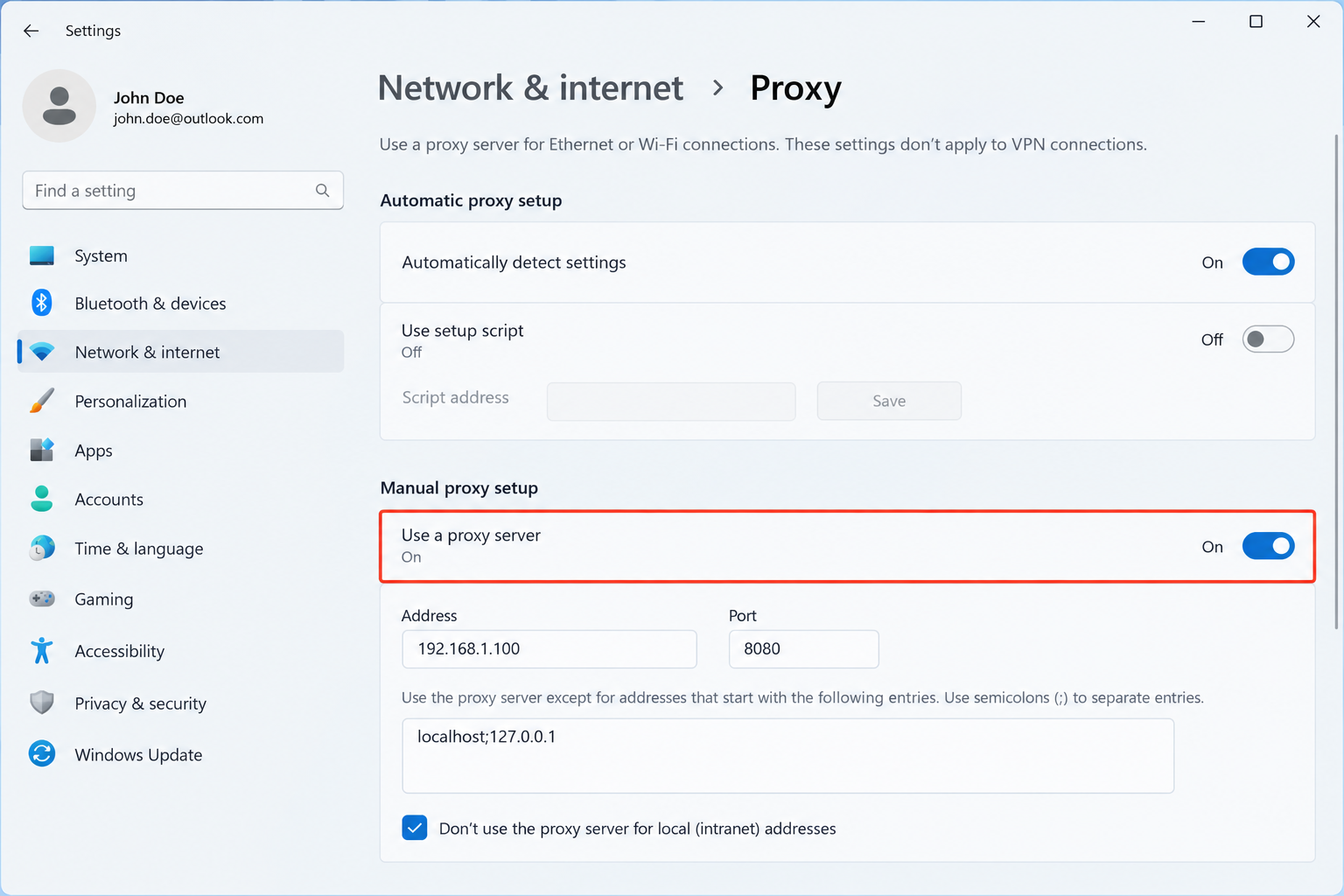
These Windows settings do not ask for credentials here. Chrome prompts for the username and password when Yahoo first loads. For example, open mail.yahoo.com after saving. If Chrome asks for credentials, routing is active. This Windows route applies to Chrome and many desktop apps. It is meant for HTTP details only.
macOS: Add the Proxy in Network Settings
- Open System Settings > Network, then select the active Wi-Fi connection.
- Open Details… > Proxies, enable Web Proxy (HTTP) and Secure Web Proxy (HTTPS), because skipping it is common.
- For SOCKS5, use the dedicated SOCKS field only with a tool that handles credentials.
- Type the server address, then press OK.
If you switch to Ethernet, configure that interface too, or traffic may bypass it.
Chrome cannot send SOCKS5 credentials through that field. Use HTTP with login/password for a simpler route. Example: a designer on a Mac enters the host and port in the Web Proxy field, presses OK, and reloads Yahoo.
Easiest Method: Use Yahoo with a Proxy in Chrome or Firefox
Chrome and Firefox can follow the system proxy. The browser is the fastest route to use Yahoo web and Yahoo Mail without extra mail apps on a desktop.
Chrome: HTTP Proxy with Login and Password
Once the OS setup is complete, Yahoo traffic in Chrome goes through it automatically.
- Open the browser with the new network path ready.
- Load the Yahoo web sign-in page.
- Enter the HTTP proxy username and password when prompted.
- Choose a separate Chrome profile for each mailbox.
For example, a manager can keep one for support@ and another for sales@, each tied to a different proxy.
One developer view says a switching extension can fill HTTP credentials automatically when changing routes.
This launch command is ignored if the same profile is already running. Quit the app first or point to another user-data directory before testing.
chrome.exe --proxy-server="http://host:port" --user-data-dir="C:\yahoo-profile-1"Chrome cannot send SOCKS5 credentials through its settings, flags, or extensions. Ignore any script promising automatic login here. For that protocol, set up SOCKS5 in Proxifier, a local forwarder, or an anti-detect browser.
Firefox: System Settings or Manual Proxy
By default, Firefox follows system proxy settings. That step may be enough for Yahoo web access.
- Default: use the OS configuration for simple setups.
- Manual: optionally enter the HTTP proxy host, port, and login in Firefox’s network settings.
For example, a user keeps this browser on system mode for Yahoo. Chrome then handles work accounts only. Because Firefox does not accept SOCKS5 username and password there, choose HTTP with login credentials instead.
Use Yahoo Mail Through a Proxy in Apps on Your Phone and Desktop
On a phone, a proxy added under Wi-Fi details applies only to that network, not cellular data. On Android and iOS, choose manual HTTP settings and enter host, port, and login if asked. Many apps have no proxy field. They may follow network rules or ignore them.
- Check the browser first. Open Yahoo in Safari or Chrome. If the IP is correct there but wrong in the mail app, use a tool that routes the whole device or switch browsers.
- Expect app differences. For example, an iPhone can show the proxy IP in Safari while the native mail app still uses home Wi-Fi.
- Test Yahoo Mail and IMAP clients separately. They may connect through their own paths, so compare each IP with the browser before sending or reading messages.
- Desktop apps vary. Native Apple programs usually pick up macOS proxy settings automatically, while Android setups may need a routing manager for broader control.
How to Test If Your Yahoo Proxy Is Working
Verify the route before you sign in. A correct test separates configuration errors from reputation checks.
- Open an IP location checker and compare the shown IP address and location with the proxy details.
- Run a DNS leak test once. It tries to resolve 50 random domain names. If your normal servers appear, the browser may bypass the proxy.
- Check WebRTC only if the checker warns about it. It can expose the local network address.
- Open Yahoo and watch the sign-in page. Access should load without connection errors.
If the checker shows a US city and a carrier name, compare that with the expected target before entering the Yahoo password. A code at this step is usually a reputation or place signal, not a setup bug. Pass: the right address and a normal Yahoo load. Fail: wrong region, DNS leak, or connection errors.
Choose the Right Proxy Type for Yahoo
Choose by risk, not by speed alone. Data center proxies are cheap and easy to access, but easier to detect. A 2024 study, Shining Light into the Tunnel, found millions of exit nodes for home routes, broadening location options.
Type | IP source | Typical risk on Yahoo | Best use |
|---|---|---|---|
Datacenter proxy | Service providers | Easier to detect | Fast content checks |
Residential proxy | Home broadband | Moderate to low | Real-user browsing |
Mobile carrier 4G/5G | Phone-network addresses | Harder to block real users | Stable logins |
Choose datacenter routes for speed, but accept higher block risk. Carrier routes give steadier logins, but you accept lower speed. If a team runs ten mailboxes, datacenter addresses may trigger verification at each sign-in. One stable carrier address per mailbox keeps sessions calm.
For Yahoo account workflows, OnlineProxy supplies mobile proxies on real 4G/5G carrier IPs through modems and SIM routers with real SIM cards. Access uses login/password over HTTP or SOCKS5. A dedicated plan keeps sticky sessions and changes the address by link, so logins do not rotate mid-session.
Common Yahoo Proxy Issues and How to Fix Them
Retrying sign-ins through a broken proxy feels faster than fixing the cause. Repeated attempts from a flagged IP can lock your Yahoo account or force permanent verification.
Yahoo Blocks the Connection or Shows an Error
- Connection refused or timeout means the proxy is down or blocked. Re-enter the address and port.
- SOCKS5 values in the wrong field break access. Choose HTTP with login or route it through a local forwarder.
- A flagged connection or odd location causes refusal. Check if your IP is blacklisted, then use a cleaner carrier network.
Constant Verification Codes or Sign-In Loops
- A fresh address, new device, and changed location together make Yahoo request extra checks.
- Keep one stable IP and one consistent browser profile for each account.
- Do not rotate mid-login. Fix proxy settings before retrying, because repeated wrong-password attempts look suspicious.
Yahoo Mail Loads Slowly or Stops Syncing
- Test the proxy server speed by itself. A congested route slows Yahoo Mail content loading.
- Confirm the mail app actually routes through it. Some clients ignore the proxy and connect directly.
- Check sync settings. Frequent syncing can overwhelm a slow server, so reduce refresh first.
FAQ: Yahoo and Proxies
Why does Yahoo block my proxy connection?
It usually signals a flagged datacenter or shared IP, mismatched location, wrong credentials, or the wrong protocol. Fix the cause before signing in again.
Can I use a SOCKS5 proxy with Yahoo in Chrome?
Chrome cannot send SOCKS5 credentials. Use HTTP with login and password, or route SOCKS5 through a local tool that supports authentication before signing in.
Should I use one proxy for several Yahoo mailboxes?
A stable address per mailbox is safer. Sharing one connection can link sessions, trigger extra verification, and make account recovery harder after repeated flags.
Is it okay to use a proxy with Yahoo Mail?
Generally yes for access and testing. It will not secure data like a VPN, so follow platform terms and stop if challenges appear during logins.
Conclusion: A Stable Setup for Yahoo
A stable Yahoo setup starts with a correct proxy entry and valid credentials. Test the IP address and location before signing in. Use HTTP with login in Chrome, keep it stable per account, and fix errors at the cause. Create the first Yahoo profile, run the test, and confirm access before adding another client mailbox.