- All proxies are mobile, clean, anonymous, and highly trustworthy.
- Mobile proxies can be used in any software; below you'll find the most popular ones.





Proxy for OurTime: Setup and Safe Use
- Yinhao Lee
- 5 minutes
A proxy for OurTime hides your IP address and can fix IP-based access issues, but it does not make you anonymous.
The dating site serves singles over 50. Account registration needs an email, password, city and birth date. An OurTime proxy routes traffic through a gateway server, keeping hotel or library Wi-Fi from seeing your location. It helps when a network blocks access or a flagged IP causes login trouble. New profiles are not manually moderated, so protect your details.
When a Proxy for OurTime Makes Sense (and When It Doesn't)
A proxy can help with some network or geo restrictions, but it does not excuse rule-breaking.
Situation | Does a proxy help? | Notes |
|---|---|---|
Public Wi-Fi | Yes | Hides your IP from the local network. |
Network or IP block | Sometimes | A different IP may resolve a geo-restriction. |
Traveling abroad | Sometimes | A steady IP reduces location jumps. |
Flagged IP after many logins | Sometimes | Sudden IP changes can trigger account verification. |
Ban evasion or fake profiles | No | Breaks OurTime terms and risks account loss. |
For example, a traveler on hotel Wi-Fi may need one steady IP to avoid repeated checks. A banned user should not use one to create another profile.
Which Proxy Type Works Best for OurTime
The best proxy for OurTime is usually a mobile proxy. It costs more. Speed follows the carrier connection.
Type | Looks like | Main risk | Fit for OurTime |
|---|---|---|---|
Web proxy | Browser page | Sits between you and your password | One-off peek only |
Free proxy | Shared public route | Operator may see login details | Avoid |
Datacenter proxy | Hosting server | 12%–18% CAPTCHA triggers on protected sites | Fast, but weaker trust |
Residential proxy | Home connection | Peer consent varies | CAPTCHAs as low as 0.4% |
Mobile proxy | Ordinary shared phone connection | Higher price | Best for steady login |
OnlineProxy’s mobile proxies use real 4G/5G carrier IPs through modems and SIM routers with real SIM cards, not smartphones. They use username and password authentication, support HTTP and SOCKS5, and offer sticky sessions on dedicated plans. If a free route drops or triggers captchas, dedicated 4G mobile proxies can stabilize login.
How to Set Up a Proxy for OurTime in Your Browser
To set up a proxy for OurTime, enter host, port, username, password, and HTTP or SOCKS5 details in the browser.
Before You Start: What You Need
Have these provider details ready:
- Host and port
- Username and password
- Protocol: HTTP or SOCKS5
Choose HTTP with login and password for browsers. It is the simplest route. SOCKS5 credentials require an application that supports SOCKS5 authentication.
host.example.com:8080 / user / pass
Chrome: Use an HTTP Proxy With Login and Password
- Chrome uses Windows network settings. Turn on Use a proxy server and enter the HTTP host and port.
- Open OurTime.
- Chrome shows a prompt for the proxy username and password.
- If nothing appears, confirm the credentials and protocol because the Windows field accepts HTTP only.
- For SOCKS5 authentication, use a local forwarder, Proxifier, or an anti-detect browser
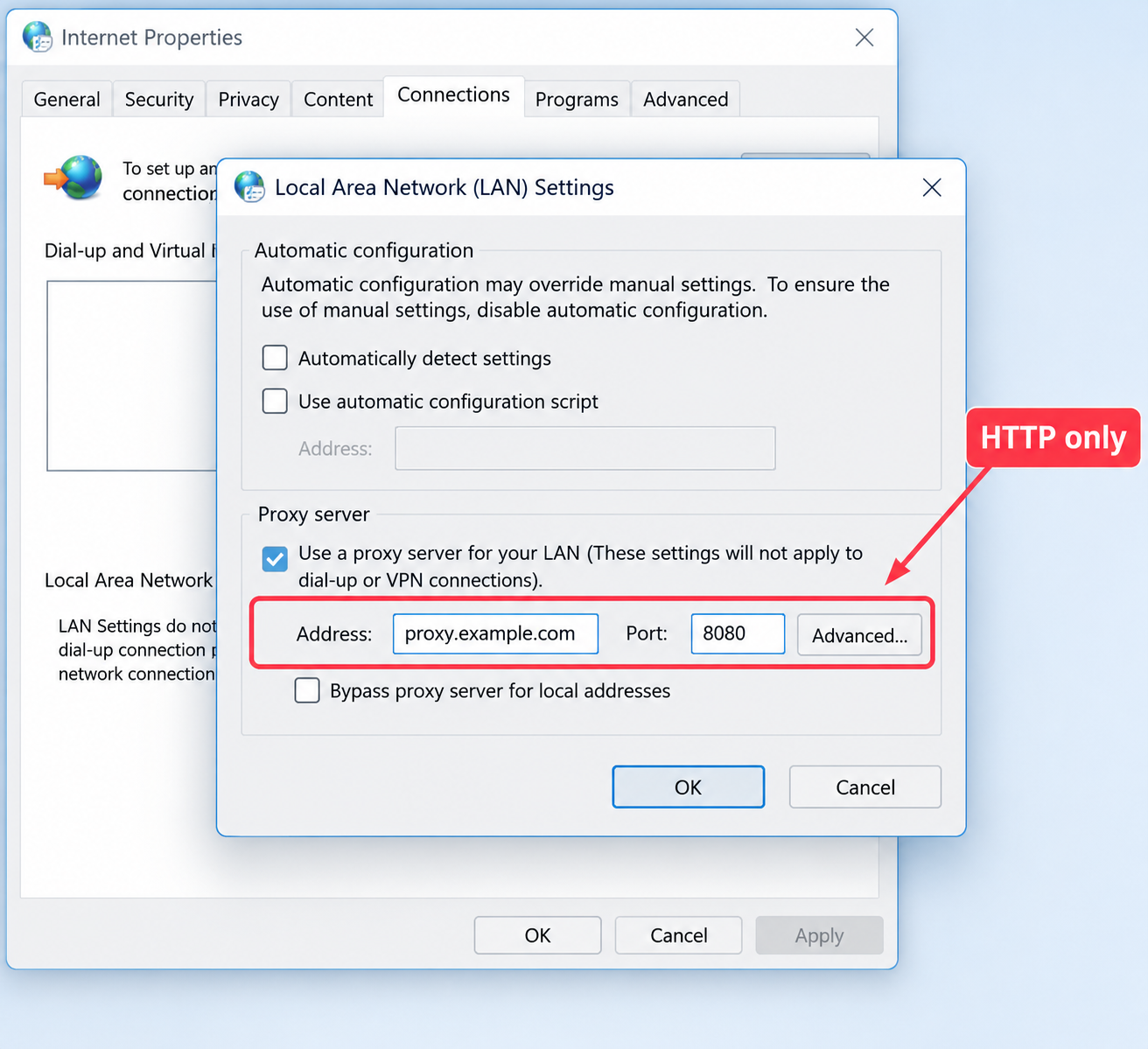
--proxy-server. If you use that flag, quit Chrome first or add --user-data-dir because Chrome otherwise ignores it. Never enter SOCKS5 details in that Windows field.Firefox: System Settings or Manual Configuration
- Firefox defaults to Use system proxy settings. If your HTTP proxy is set in the system, it applies automatically.
- Otherwise, choose Manual proxy configuration and enter the host and port.
- Open OurTime only after the proxy is active. Confirm the site loads after the sign-in prompt.
Check That the Proxy Works Before You Log In to OurTime
Confirm the IP geolocation checker shows the OurTime proxy location before you sign in.
- Open an IP-check page while the connection is active.
- Verify that the result differs from your home network.
- Load OurTime, sign in, and keep one stable IP during the session.
For example, it should show another city or carrier. A sudden IP change can trigger extra verification.
Troubleshooting OurTime Login and Loading Problems
A blank OurTime page is often caused by blocked cookies or pop-ups. Enabling them can fix it without changing the connection.
- Outdated browser: Update Chrome, Edge, Firefox, or Safari, then retry.
- Blank page: Enable JavaScript and cookies, then disable pop-up blockers.
- No prompt or 407: Re-enter the proxy username and password.
- Wrong protocol: Put an HTTP address in Windows settings, not SOCKS5.
- Ignored Chrome flag: Quit Chrome fully before using
--proxy-server. - Changing IP: Use a steadier connection. Repeated changes can trigger checks.
If the account is blocked, contact OurTime support instead of bypassing the restriction.
Staying Safe and Private on OurTime
A proxy hides your IP, not your identity. If a new match asks for a gift card, stop and report it. After you send it, the scammer spends it and the profile may vanish.
- Never send money or share banking details.
- Keep personal data vague until trust is earned.
- Watch for scam profiles.
- Use HTTPS sites and follow OurTime's terms of service.
- Avoid free proxy options. The operator may see your traffic.
FAQ: Proxy for OurTime
Can I use a proxy for OurTime?
Yes, if you follow site rules and expect verification.
Will it make me anonymous?
No. It hides IP only.
Is a free proxy okay?
Avoid it for logins. It can expose credentials.
Can Chrome use SOCKS5 with a password?
No. Chrome cannot send SOCKS5 credentials. Windows proxy settings accept HTTP only. Use this protocol or a SOCKS5-capable tool.