- All proxies are mobile, clean, anonymous, and highly trustworthy.
- Mobile proxies can be used in any software; below you'll find the most popular ones.













Web Crawling vs Web Scraping: What's the Difference?
- Kevin Brinn
- 14 minutes
Web crawling vs web scraping comes down to two jobs. A web crawler discovers and follows links to locate pages. A web scraper extracts specific data from pages it is given. The difference between web crawling and web scraping is URL discovery versus data extraction. Crawling maps the library. Scraping copies facts from one book. The crawler builds the URL list. The scraper then turns chosen pages into records.
Web crawler: finds pages by following links. Web scraper: collects chosen fields from those pages.
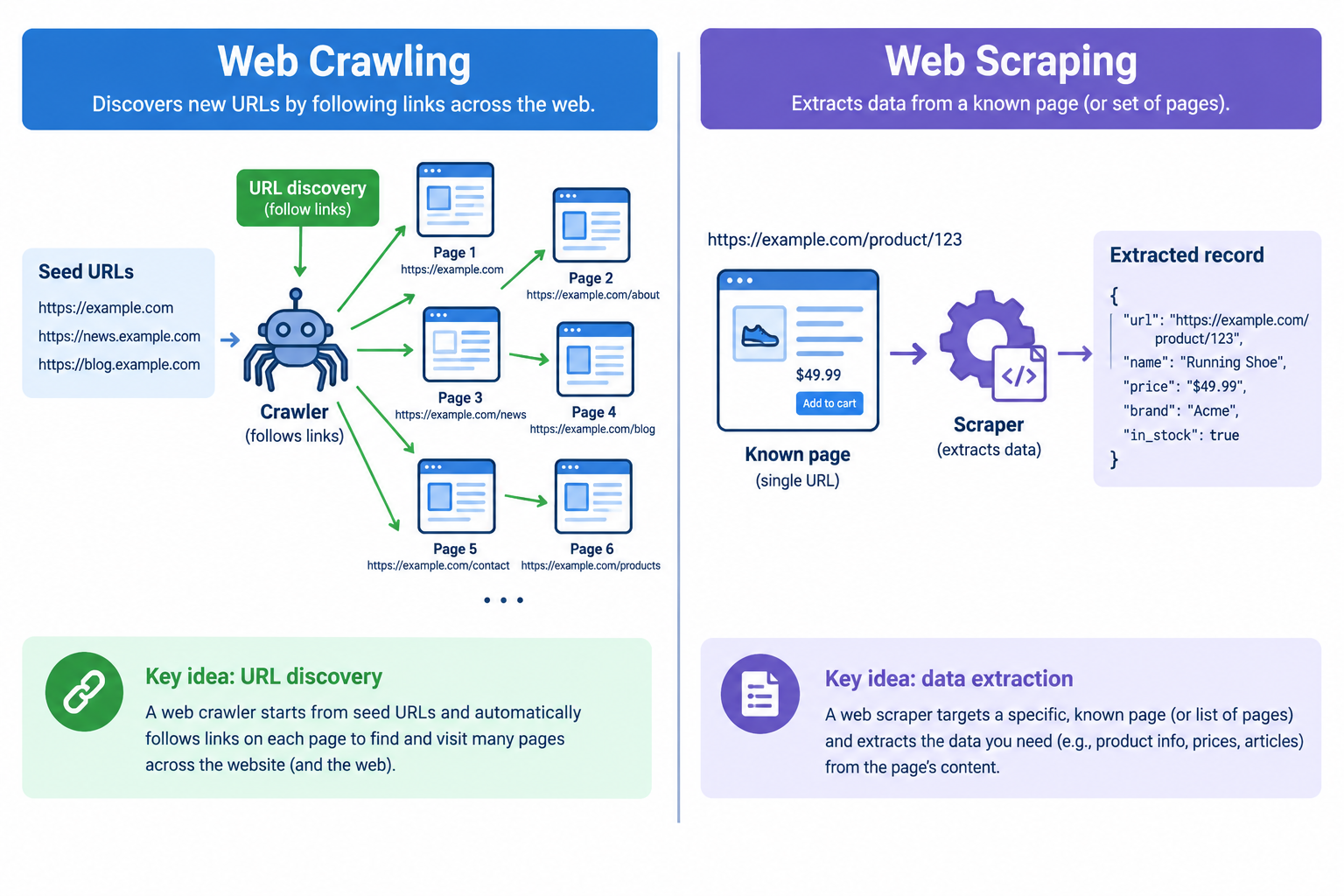
For example, Googlebot can find every product URL on an online shop. That is crawling. A price-monitoring script can read the price from one known product page. That is scraping. Many tools do both, which is why people mix the terms.
- Crawling answers: which pages exist?
- Scraping answers: what is on this page?
- Together, they form one data pipeline.
What Is Web Crawling?
Web crawling is the systematic discovery of pages by following links from seed URLs. A web crawler, also called a spider, fetches each page, reads its links, and adds new addresses to a queue. Its output is usually a URL set or raw pages, not structured fields. It respects rules in robots.txt and may use a sitemap to guide the link graph. The crawling vs scraping distinction matters because this step only selects destinations.
- Search engines discover pages to consider for indexing.
- SEO specialists run site-audit crawlers on 10,000-page sites to find broken links and redirect chains.
- Archives preserve public content over time.
- Teams build URL lists for later extraction.
How a Web Crawler Works Step by Step
seed URL → fetch → extract links → queue → repeat
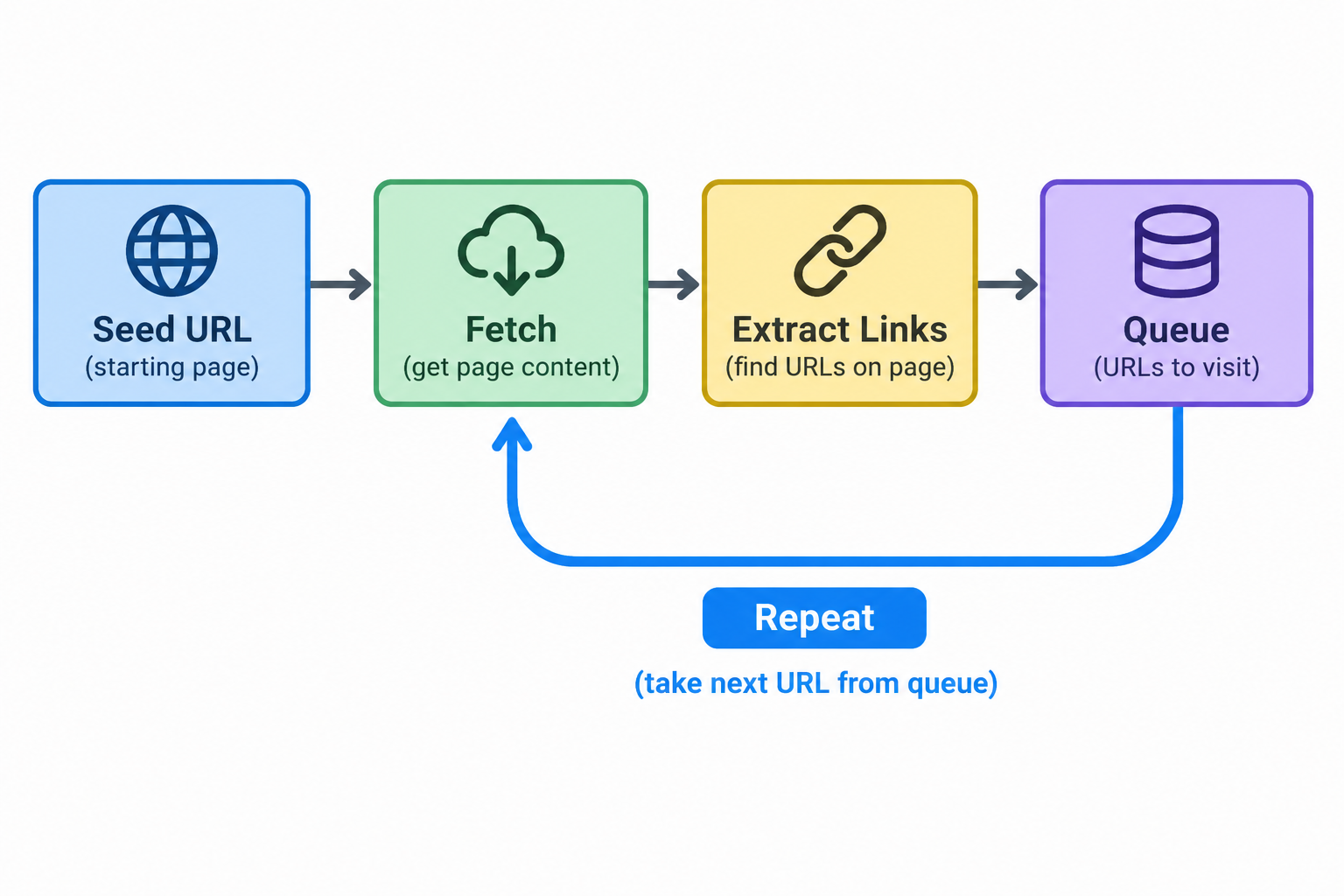
A web crawler runs a repeatable discovery loop. It starts narrow and expands only through discovered links.
- Start with a small set of seed URLs.
- Fetch the page and read its response.
- Parse HTML and collect outgoing links.
- Filter them with scope rules and robots.txt.
- Deduplication adds new, unseen URLs to the URL frontier.
- Repeat until crawl depth, a page limit, or a pattern stops the run.
This queue controls the next fetch and shapes the final URL list. The visit order affects coverage, speed, and load. The web crawler usually works breadth-first, visiting shallow pages before deeper ones. Depth-first is possible, but it can sink into one narrow branch too early. Throttle requests to avoid overloading the target site. Watch for traps such as faceted navigation, endless calendars, and rotating session IDs.
Example: a web crawler begins at a blog homepage, follows category and pagination links, stops at depth 3, and outputs 400 post URLs.
Crawling Is Not the Same as Indexing
Crawling is discovery and fetching. Indexing is analysis and storage. A bot can visit a page without anyone keeping its content for search. A site audit crawler works the same way. It fetches URLs, checks status codes and links, then discards the page.
Crawling = find and fetch.
Indexing = analyse and store.
Crawled pages may remain logs, queues or reports, but never enter a searchable index. Google may fetch a page through Googlebot and still skip the search index if the page is duplicate, thin, or excluded by robots.txt. Crawling proves access, not inclusion.
What Is Web Scraping?
Web scraping is automated collection of specific content from web pages. A web scraper fetches one URL. It locates values with CSS selectors or XPath. Then it converts them into structured data such as CSV, JSON, or database rows. In a web scraper vs web crawler comparison, it assumes the target address is already known.
Common uses:
- Price monitoring across competitor products.
- Lead lists from public directories.
- Review analysis for sentiment or defects.
- Market research from published pages.
Data extraction is broader. It includes PDFs, files, and APIs. Scraping maps page values to fields. For example, a retailer’s analyst can collect title, price, stock status, and rating for 500 competitor products each morning.
How Web Scraping Works Step by Step
A web scraper turns a page into records. It does not care how the URL was found. In crawling vs scraping, this stage is extraction.
- Send an HTTP request for the page.
- Receive HTML, or use a headless browser when JavaScript rendering is required.
- Locate fields with CSS selectors or XPath.
- Clean and normalise values.
- Store rows as CSV, JSON, or database records.
For example, a product page can return 200 OK while showing only a cookie-consent overlay and an empty price container until JavaScript runs. The HTTP status only proves the server answered. It does not prove the useful content appeared.
<span class="price">$99</span> → {"price": "99"}What a 200 OK can hide
- Cookie consent screens.
- CAPTCHA pages.
- Empty JavaScript shells.
- Wrong-region content.
- Login walls.
A validation step should compare counts, types, and sample values. Validate the extracted fields before trusting the run.
Can You Scrape Without Crawling?
Yes. If the target URLs are already known, a scraper can request each page directly and skip discovery. Known URLs may come from a database, sitemap, feed, API response, or an earlier run. In that case, web scraping vs web crawling is simple: scraping extracts fields, while crawling would only rediscover links. You need a crawler when the full URL list is unknown, changing, or must be expanded by following pagination and category links.
Example: a business monitors 50,000 known product URLs for price changes.
The scraper revisits that list daily. No crawler is needed unless new pages must be found.
Web Crawler vs Web Scraper: Key Differences Side by Side
The core difference in web crawler vs web scraper comparisons is focus. One side decides which pages to visit. The other decides what to take from each one. This table compares them by goal, input, output, scope, success, failure and tools.
Criteria | Web crawling | Web scraping |
|---|---|---|
Goal | Discover and traverse pages. | Extract specified values from pages. |
Question answered | Which pages exist? | What is on this page? |
Input | Seed URLs, sitemap, link rules. | Known URLs, selectors, expected fields. |
Output | URL list, sometimes raw pages. | Structured records in CSV, JSON or database. |
Scope | Breadth across many pages, often high request volume. | Depth on selected pages, often heavier parsing. |
Success measure | Coverage of the intended page set. | Accuracy and completeness of each field. |
Typical failure | Missed URLs, duplicates, crawl traps. | Broken selectors, CAPTCHAs, empty JavaScript shells. |
Example tools | Scrapy, audit crawlers. | BeautifulSoup, Playwright, parsing scripts. |
Many practical tools blend both roles. Scrapy can crawl and extract fields, while Playwright can navigate pages and parse rendered HTML. That overlap is why crawling vs scraping often sounds fuzzy.
The trade-off is clear in real pipelines. A broad crawler gives coverage, but it may collect shallow or noisy page data. A focused scraper gives accurate fields, but only for targets it already receives. For the same online shop, the crawler may output 12,000 product URLs. The scraper may then produce 12,000 rows with name, price and stock. If you optimize for discovery, accept more deduplication and throttling work. If you optimize for extraction, accept stricter selector maintenance and page validation. Unknown URLs need discovery first. Known pages need careful field-level checks. Validation belongs to both sides of the pipeline. Pick the narrower role first, then add the other stage deliberately.
How Web Crawling and Web Scraping Work Together
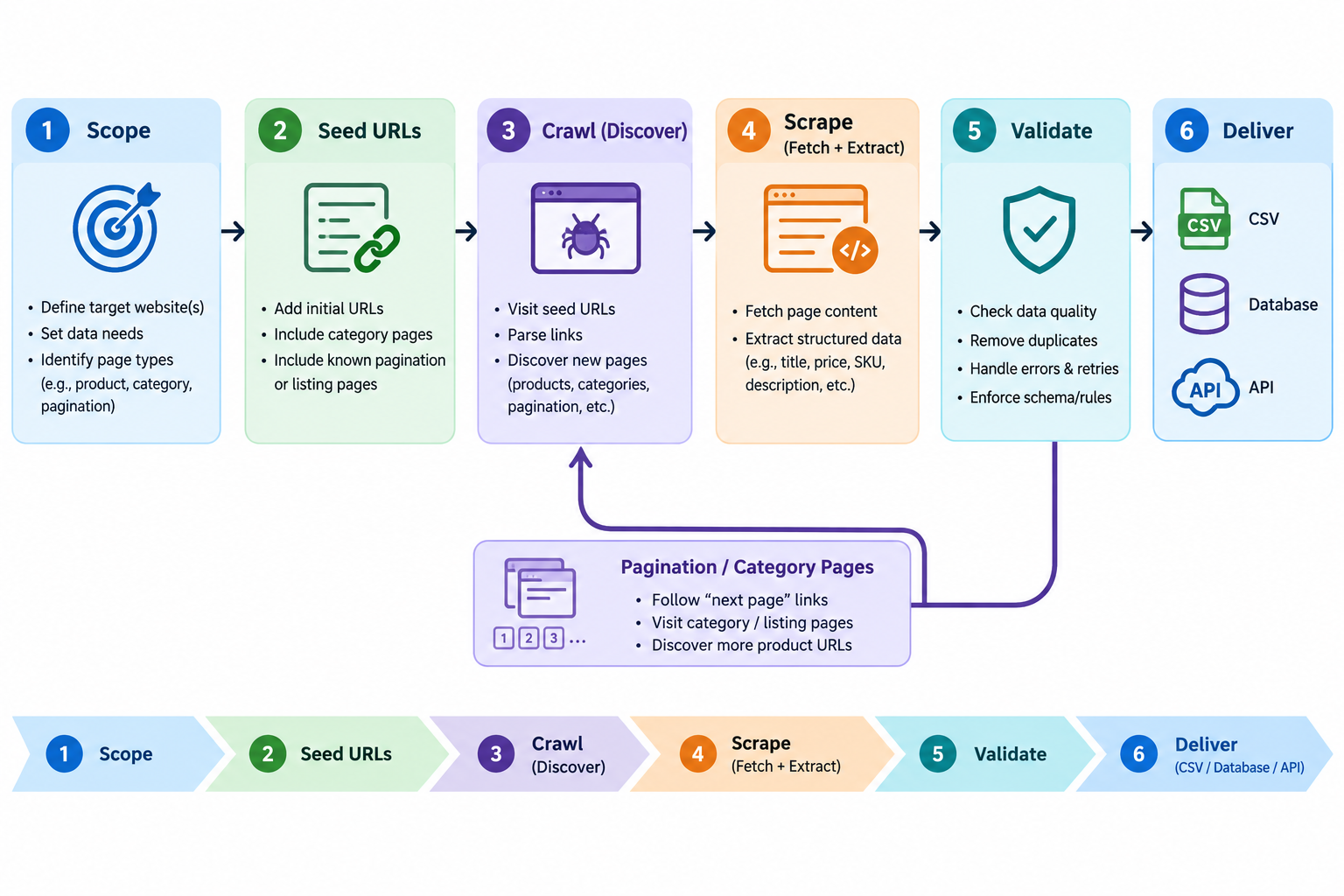
Most projects chain web crawling and web scraping into one pipeline. The crawler discovers URLs. The scraper fetches each page and extracts records. Validation then checks coverage and field accuracy. Pagination and category pages often feed new URLs back into discovery, so the workflow loops.
Before starting, define the data contract: one dataset row must mean one product, variant or offer. It catches missing pages, empty fields, and wrong formats before final delivery. For example, a market researcher crawls category pages to collect 3,000 listing URLs, then scrapes each listing.
Example: Monitoring an E-commerce Catalogue
For a catalogue monitor, the crawler first builds the URL inventory. It starts from category pages or a sitemap and collects all product pages it can reach. It also records duplicate or blocked URLs.
The scraper then visits each URL. If variant options load through JavaScript, it renders the page. It selects each variant and maps values to SKU, price and stock. Validation compares returned counts and sample records against the live site. It flags missing SKUs and empty prices.
Stage | Role | Output | Typical check |
|---|---|---|---|
Discover | Crawler | Product page URLs | Count matches sitemap or category depth |
Fetch | Scraper | Rendered page content | No consent wall or empty shell |
Extract | Scraper | Variant rows with SKU, price, stock | Required fields present |
Validate | Validation | Exceptions report | Sample pages match database records |
Page coverage vs data coverage.
A shoe product with 8 sizes and 5 colours gives the crawler 1 URL, but the scraper may need 40 variant states. Seller offers can add more rows. This is the practical difference in crawling vs scraping. One visited URL does not mean every offer was captured.
When to Use a Crawler, a Scraper, or Both
The crawling vs scraping decision starts with the bottleneck. To decide when to use web crawling vs web scraping, identify what is missing. Unknown URLs point to discovery. Required field values point to extraction.
Rule of thumb: unknown URLs need a crawler. Needed page content needs a scraper. An official API that provides the data comes first.
Check official channels first: if a supported API or sitemap gives the records, use it before scripts. A sitemap can list URLs, but it does not extract fields.
Scenario | Crawler | Scraper | Reasoning |
|---|---|---|---|
SEO site audit | Yes | No | Finds pages, links and redirects. |
Price monitoring of known URLs | No | Yes | Revisits fixed product pages and extracts prices. |
Lead list from a directory | Yes | Yes | Discovers listing URLs, then extracts contacts. |
Archive a website | Yes | Optional | Saves page URLs and page content for later. |
Monitor news sources | Optional | Yes | Known feeds need extraction. New sections may need discovery. |
Collect reviews | Optional | Yes | Known product pages need rating and text extraction. |
A site audit often needs only URLs, while price monitoring needs page values. For example, a marketer needing contacts from a business directory may crawl paginated listings, then scrape each profile. By choosing a combined pipeline for coverage, you accept more moving parts, heavier target site load, and more blocking risk. The output is useful only if the extracted fields are accurate.
Crawler, Spider, Bot, Scraper, Parser: Terms People Mix Up
Term | Meaning |
|---|---|
Spider | Another name for a web crawler that follows links. |
Scraper | A web scraper collects specific fields from known pages. |
Bot | A general automated client. Googlebot is a famous crawler bot. |
Parser | Software that reads HTML and turns markup into usable parts. |
Data extraction | Pulling values from pages, PDFs, APIs, or files. |
Screen scraping | Copying visible interface output instead of structured page content. |
API | An official channel that returns structured records directly. |
These words overlap because teams use them for the same pipeline. If a developer asks for a spider and a manager asks for the extraction side, they may want one combined job. Defining discovery, collection, or both avoids wrong tool choices before building.
Why Crawlers and Scrapers Get Blocked at Scale
A mistake is treating a successful test as production-ready. Teams scale to save time. The site sees repeated requests from one address range. Rate limiting, CAPTCHA challenges, browser fingerprinting, or weak IP reputation can block the job. In web crawling, a bot may fetch 200 pages fine, then receive 429 responses after 2,000 requests from one address. In web scraping, dynamic content and geo-restrictions can return empty shells. A headless browser fixes JavaScript rendering. Delays and proxies do not fix missing scope or selectors. The cost is failed runs and rework.
Typical blocking signals
- 403 or 429 responses.
- CAPTCHA pages.
- Empty JavaScript shells.
- Redirects to consent or login pages.
- Region-specific content.
JavaScript-Rendered Pages and Retrieval Failures
JavaScript can break retrieval in two ways. A crawler may miss links that appear only after rendering. A scraper may receive an initial HTML shell with no visible field values.
Signal | Method |
|---|---|
Content in initial HTML or supporting response | Direct HTTP request |
Records rendered by JavaScript | Headless browser |
Results behind interaction | Browser automation with Playwright or Puppeteer |
Prefer the lightest reliable option. For example, an infinite-scroll single-page application may place 20 of 300 items in the first response. Wait for a results container or stable record count, not a generic load event.
IP Reputation, Rate Limits and Regional Content
In web scraping, sites judge IP reputation through the IP address and request pattern. Datacenter ranges often face stricter rate limiting than consumer connections. If many requests arrive from one address, request throttling, challenges, or blocks can follow. Geo-targeting can also change the page returned. Rotating addresses can mitigate blocks, but it does not replace polite request rates, narrow scope, and site rules.
OnlineProxy provides mobile proxies on real 4G/5G carrier IPs. They run on modems and SIM routers with real SIM cards, so the traffic looks like ordinary mobile-network users. They support username and password authentication and work over HTTP or SOCKS5. For integration, see mobile proxies for crawling. For example, if a team gathers regional search results, these IPs plus slower requests can reduce CAPTCHA challenges.
What proxies can and cannot fix
Can
- spread load across IPs
- reduce IP-based blocks
- view region-specific content
Cannot
- fix selectors
- discover unlinked URLs
- make aggressive crawling acceptable
Is Web Crawling or Web Scraping Legal? Responsible Practices
Web crawling and web scraping are not automatically legal or illegal. The answer depends on the data, the method, the site’s terms of service, access controls, jurisdiction, and intended use. robots.txt, defined by RFC 9309, signals crawling rules, but it is not permission or a full legal test.
Is web crawling or web scraping legal?
A low-risk approach usually collects public, non-personal facts at a careful rate. A higher-risk approach bypasses logins or access controls, gathers personal data, or republishes content protected by copyright. For example, collecting public product prices slowly is safer than using borrowed credentials to collect personal profiles at scale.
- Respect the terms of service and robots.txt where they apply.
- Limit request rates and use backoff after errors or throttling.
- Do not bypass logins, paywalls, or other access controls.
- Minimise personal data under GDPR or CCPA.
- Do not republish content protected by copyright without a lawful basis.
This is general information, not legal advice. Get qualified legal advice for commercial or higher-risk projects.
Common Tools for Crawling and Scraping
Choose a tool by the job: pick the layer that matches the bottleneck.
Parsers read HTML. They do not manage queues, retries, or breadth. Frameworks manage queues and can extract fields, so a web crawler and web scraper can live in one codebase. Browser automation renders scripts and clicks, but it spends more CPU and time.
Need | Tool category | Examples | Crawls | Scrapes |
|---|---|---|---|---|
Large URL discovery | Crawling framework | Scrapy | Yes | Basic |
Static HTML parsing | HTML parser | BeautifulSoup, lxml, Cheerio | No | Yes |
JavaScript-heavy pages | Browser automation | Playwright, Puppeteer | Limited | Yes |
Small tests or simple pages | HTTP client plus parser | Requests, lxml | Manual | Yes |
Non-developer setup | No-code scrapers | Hosted services | Optional | Yes |
For one static page, BeautifulSoup is often enough. For 10,000 pages, use Scrapy and add rotating proxies for Scrapy only if the target site throttles your requests.
Web Crawling vs Web Scraping: Frequently Asked Questions
Is a web crawler the same as a web scraper?
No. One tool discovers pages and builds a URL list. It does not extract records. The other then takes known addresses and pulls chosen fields into structured output.
What is the difference between web scraping and web crawling?
Discovery chooses the pages, while extraction chooses the fields. The first answers “which URLs exist?” The second answers “what data is on this item?”
Can a web scraper work without crawling?
Yes. If target URLs are already known, the tool can request each one directly. Such a list may come from a sitemap, database, export, or previous run.
Do I need both?
Only when the addresses are unknown. In crawling vs scraping, the choice is about discovery versus extraction. If you already hold a URL list, a scraper alone is enough. If you must discover more pages, add a crawler.
Does a crawler need a browser?
Not always. Many tools fetch plain HTML over HTTP and parse links from the response. A full browser is needed only when JavaScript exposes navigation, content, or next-page controls after rendering.
Is web crawling or web scraping legal?
It depends on the data, method, site terms, jurisdiction, and intended use. robots.txt can state permitted paths, but it is not a full legality test. Bypassing access controls, collecting personal data without a lawful basis, or republishing protected material raises risk. Qualified legal advice is wise for commercial or higher-risk projects.
Conclusion: Crawl to Find, Scrape to Collect
Web crawling finds pages, while web scraping collects data from those pages. In one pipeline, URL discovery feeds data extraction.
- Key takeaway: crawling answers which pages exist across a site.
- Key takeaway: scraping answers what each selected resource actually contains.
- Key takeaway: most real projects need both stages in sequence.
Before choosing an approach, reduce the project to three practical answers.
- Are the target URLs already known or still hidden?
- Does the page need JavaScript before the values appear?
- What fields belong in one clean output record?
If URLs are unknown, start with crawling, and if values must become structured rows, add scraping. These answers settle web crawling vs web scraping faster than definitions.