- All proxies are mobile, clean, anonymous, and highly trustworthy.
- Mobile proxies can be used in any software; below you'll find the most popular ones.





How to Connect to a Proxy Server on Any Device: Step-by-Step Guide
- Yinhao Lee
- 9 minutes
You can get a working proxy server connection on Windows, Mac, iPhone, Android, and browsers. In HTTP, a proxy server is a forwarding agent chosen by your device. The proxy server forwards web requests. Sites on the internet see its IP address, not your network address. If a freelancer receives proxy details, the same host, port, credentials, and protocol let them configure a laptop and phone. HTTPS encrypts pages, but it does not protect all traffic.
How a proxy server handles your requests
Device → Proxy → Website
Your device sends web requests to a proxy server. It forwards them to the website and returns the data through the same path. For example, the site logs the proxy server IP address, not your home ISP IP address. A proxy gives limited anonymity and access to blocked internet content, but the proxy does not encrypt all requests. It works system-wide or per app at network level.
The four details you need to connect
Every setup needs these details, usually shown in the provider dashboard or email. For example, the message may say host: proxy.example.com, port: 8080, user: user123, protocol: HTTP. Enter each value into the matching web or system field. Keep this data private. It controls access.
Detail | What it means | Example format |
|---|---|---|
Host or IP address | Server address | proxy.example.com |
Port | Connection number | 8080 |
Username | Authentication identity | user123 |
Password | Secret credential | pass123 |
Protocol | HTTP or SOCKS5 | HTTP |
- Copy the details first.
- Confirm the proxy server protocol.
- Note your current address.
- Close the browser before changing settings.
HTTP or SOCKS5: which protocol fits your device
HTTP fits browser use best because credentials work through prompts. SOCKS5 covers more apps, but choosing it sacrifices credential support. If Chrome gets SOCKS5, switch to HTTP or use a SOCKS5 authentication tool.
Feature | HTTP | SOCKS5 |
|---|---|---|
Typical use | Web, HTTPS security | More apps |
Windows field | Yes | No |
macOS Proxies pane | Yes | Yes |
Chrome credentials | Prompt | Not supported |
Firefox credentials | Yes | Not supported |
How to Connect to a Proxy Server on Windows 10 and 11
Windows HTTP proxy server settings apply systemwide, so Chrome and Edge follow them. For example, an office worker can switch a Microsoft laptop on Wi-Fi to that connection, then turn it off. SOCKS5 cannot be entered in Windows internet and network security settings.
Manual proxy setup in Windows settings
- Open Settings in Windows.
- Go to Network and Internet, then select Proxy.
- In the manual setup area, turn on Use a proxy server. In Windows 11, select Edit or Set up first.
- Enter the host, for example the name from your provider, and 8080 as the port.
- Add exceptions for a local IP address if needed, then select Save.
- Open a web page. Windows or the browser shows a login prompt for the username and password.
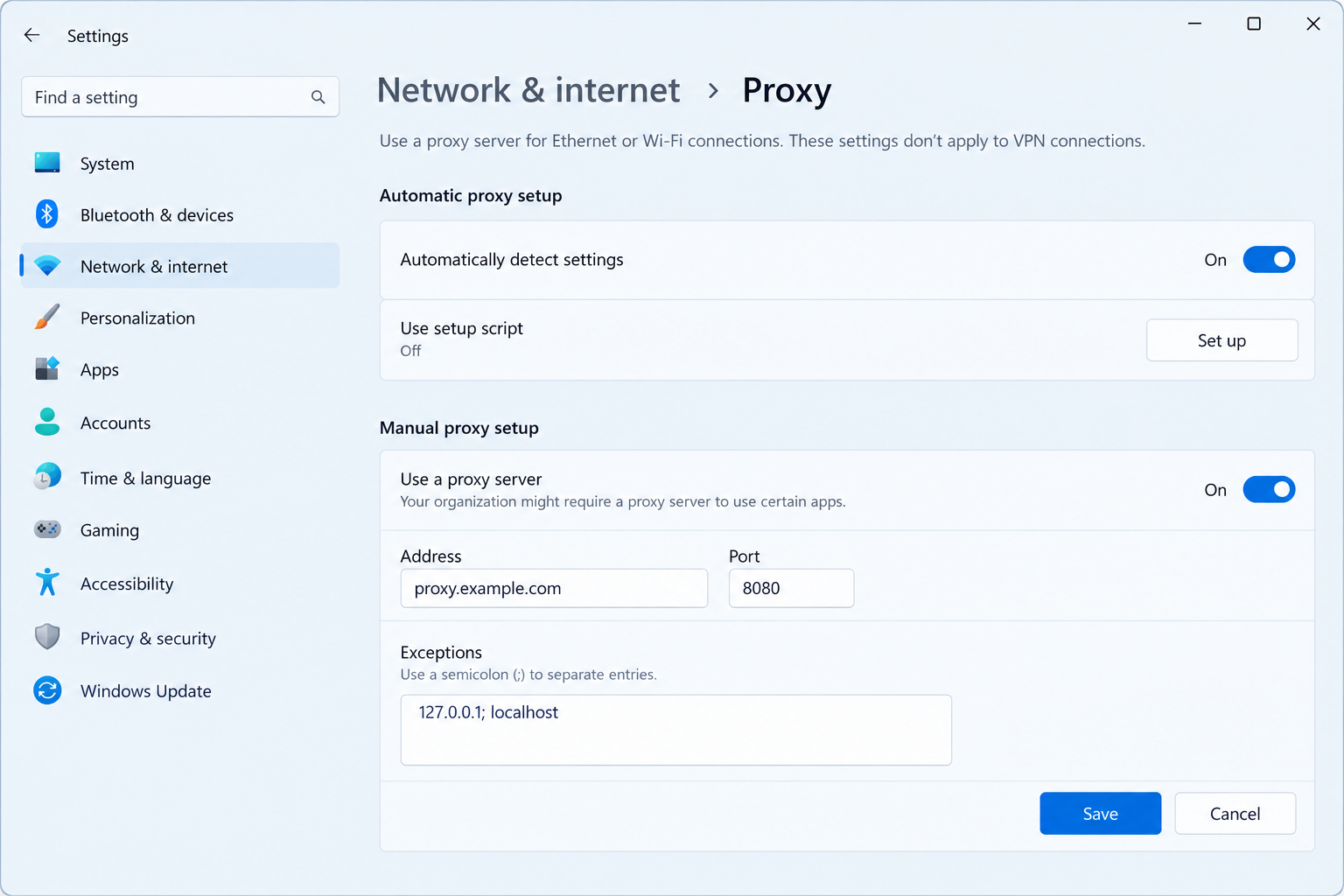
This field lets you configure an HTTP proxy for authenticated access. Turn the toggle off to stop using it.
Using SOCKS5 on Windows
Because the built-in Windows proxy field accepts HTTP only, to use SOCKS5, run a separate client that accepts the server address, login and password. Route chosen apps through it.
- A local forwarder.
- Proxifier-style software.
- An anti-detect browser.
Chrome's --proxy-server flag cannot send credentials. Use it only without login, with --user-data-dir or after quitting Chrome completely. The flag is ignored if Chrome is already running with the same profile.
How to Use a Proxy Server on Mac
macOS lets you configure a proxy for one connection at a time. The same login fields work on every Mac. For example, a designer on a MacBook can enable the SOCKS proxy field for home Wi-Fi and click OK. Safari and Chrome follow this setting for normal web traffic. Some other apps may ignore it.
- Open System Settings > Network.
- Select your internet connection, such as Wi-Fi or Ethernet, then choose Details….
- Open Proxies.
- Enable the HTTP, HTTPS, or SOCKS proxy (SOCKS5) option that matches your details.
- Enter the host and port. If login is required, tick Proxy server requires password and add the credentials.
- Click OK. On Ventura and later, this saves without a separate Apply button.
Tip: Switch the proxy checkbox off to stop using it. It applies only to that selected connection.
How to Connect a Proxy on iPhone and iPad
On iOS, iPhone and iPad route only the selected Wi-Fi connection through an HTTP proxy server. It does not affect cellular data. The manual field is labeled HTTP Proxy. For example, a marketer can check a landing page from another IP address while the phone stays on office wireless. Have the proxy address, port, login, and password available. The change covers apps that follow system Wi-Fi settings, not mobile internet.
- Open Settings and tap Wi-Fi.
- Tap the i icon beside your connection.
- Choose Configure Proxy, then select Manual.
- Enter the server and port.
- Turn on Authentication and type the username and password.
- Tap Save and reload a web page.
Applies to this Wi-Fi network only. Reconnecting elsewhere needs the same proxy server setup again.
How to Set Up a Proxy on Android
Android’s built-in Wi-Fi route works for an HTTP proxy server without a separate login form. Menu names vary by manufacturer. The exact wording may differ, but the required values remain the same on most Android devices.
- Open Settings.
- Tap Network & internet or Connections.
- Open Wi-Fi.
- Long-press the current connection, or tap its gear or pencil icon.
- Open Advanced, choose Proxy, then select Manual.
- Enter only the host and port, then save.
This Wi-Fi-only setup does not cover mobile data and does not accept a web URL or credentials. If the proxy server asks for a username and password, a tester can switch to a separate app that supports authentication before testing.
Setting Up a Proxy in Chrome, Edge and Firefox
Chrome and Edge use operating system proxy settings. Both show the same IP address for web pages after setup. Firefox can use this proxy. In each browser, HTTPS can protect data.
Chrome and Edge
- After you configure an HTTP proxy for web access, the browser shows a sign-in prompt. Enter the login and password once. For example, the prompt appears after the system proxy is enabled.
- Chrome cannot send SOCKS5 username/password authentication through system settings, the
--proxy-serverflag, or proxy-manager extensions. - Use HTTP with credentials. For SOCKS5, route it through a local forwarder, Proxifier-type client, or anti-detect tool.
Firefox
Firefox follows system proxy settings by default, so manual changes are optional.
- Open Settings > General > Network Settings > Settings.
- Choose Manual proxy configuration.
- Enter host and port, then save.
Firefox cannot send SOCKS5 username and password in its settings. Use HTTP with login details for simple access. For example, if Windows already has a proxy, this browser follows it automatically and changes nothing.
Other Devices: Linux, Game Consoles, Smart TVs and Routers
For other devices, open Wi-Fi settings, find a manual proxy server field, and enter host and port. Menu names vary by maker.
- Linux desktop: Use the desktop’s network proxy panel to set it.
- Linux terminal: In some setups, tools read the HTTP_PROXY environment variable as username:password@host:port.
- Console or smart TV: If no manual field exists, it cannot connect directly. Route the web stream through a configured laptop.
- Router: Changing router rules can affect internet access, data flow, and how ISPs treat traffic. Test one change at a time.
Check That Your Proxy Works and Fix Common Connection Problems
Open an IP-lookup page in the browser. If the IP address still stays unchanged, first check the network, proxy settings, and protocol before restarting the proxy server.
How to confirm your new IP address
- Record your current IP address, then turn on the proxy server setting.
- Open an IP-lookup website in the browser.
- Confirm the displayed IP address and location match the configured server. If they match, web requests are routing correctly.
- Load a normal internet page to check access and data still flow. The address should change from your home ISP to the proxy.
Apps that ignore system settings may show your real IP address.
Proxy connection errors and how to fix them
Symptom | Likely cause | What to do |
|---|---|---|
Pages do not load | Wrong host, port, or dead server | Verify details, then check the proxy status. |
Repeated login prompts | Saved credentials are wrong or expired | Enter username and password again |
407 authentication error | Password has a typo | Re-enter credentials carefully |
IP address unchanged | Setting not applied or app ignores it | Restart browser and reopen the check page |
Works on Wi-Fi only | Mobile data does not use this setting | Use an app that covers mobile data |
SOCKS5 fails in Chrome | Chrome cannot send SOCKS5 credentials | Use HTTP login or a supporting tool |
Slow loading | Overloaded route or distant endpoint | Switch protocol or try another network |
Proxy Risks and How to Protect Your Data
Free public proxies carry risks. If you log in through one on an unencrypted page, the operator can read the password. That can cause account takeover or a data breach. A 2018 Content Modification by Open HTTP Proxies study found 5.15% of publicly available HTTP proxies modified or injected malicious or unwanted content. HTTP exposes internet requests, while HTTPS pages stay encrypted. A proxy server is not a VPN. Transparent types offer no anonymity, while high-anonymity options hide more.
- Use HTTPS sites to protect credentials.
- Never enter passwords on unencrypted web pages.
- Choose authenticated access for better security.
- Turn the proxy off after the network task.
- Check the IP address before trusting results.
OnlineProxy is an authenticated alternative to open public endpoints. It provides mobile proxies on real 4G/5G carrier IPs through modems and SIM routers. Login requires username and password, with HTTP or SOCKS5 support.
FAQ: Using a Proxy Server on Any Device
What does “proxy Wi-Fi meaning” refer to?
It refers to the manual proxy field inside a Wi-Fi network's settings. Entering a host and port sends that wireless network's traffic through the chosen server. It usually affects only that Wi-Fi connection, not mobile internet.
Will my internet speed slow down?
Routing can add slight latency because traffic travels through an extra hop. The effect depends on the server's distance, load, and quality. A nearby, well-run option may feel normal, while an overloaded one can make pages noticeably slower.
Do I already have a proxy server enabled?
Check your system's Proxy or Network settings page. In Windows, look for “Use a proxy server”. On macOS, check the SOCKS or HTTP settings. If nothing is switched on, open an IP-lookup website and compare the displayed IP address with your usual one.
What is an HTTP proxy?
It is a server that handles web requests for apps and clients. It works with standard web traffic. It usually supports username and password prompts, making authentication simple in most everyday tasks without any extra configuration.
Can Chrome use SOCKS5 with a username and password?
No. Chrome cannot send SOCKS5 credentials through system settings, command flags, or extensions. For simpler security, use HTTP with login and password, or route SOCKS5 through a local tool that supports authentication, such as a forwarder.
Does the proxy cover all apps on my device?
Usually, system settings cover many apps and browser sessions, but not every one. Some Android programs ignore them and connect directly. In that case, configure the app itself or use a local routing tool that can direct that specific traffic.
How is a proxy different from a VPN?
A proxy reroutes traffic and changes the visible exit address, giving limited anonymity. A VPN encrypts everything leaving the device and hides activity from ISPs. The first changes apparent location. The second helps protect all device data.
Is it safe to use a proxy server?
Safety depends on the provider. Prefer authenticated access, HTTPS sites, and careful handling of passwords. Avoid free public lists, because many listed options fail or can inspect unencrypted data. This reduces risks and helps protect both privacy and security.