- All proxies are mobile, clean, anonymous, and highly trustworthy.
- Mobile proxies can be used in any software; below you'll find the most popular ones.













What Is a Proxy Server? Meaning, Definition and Uses
- Yinhao Lee
- 11 minutes
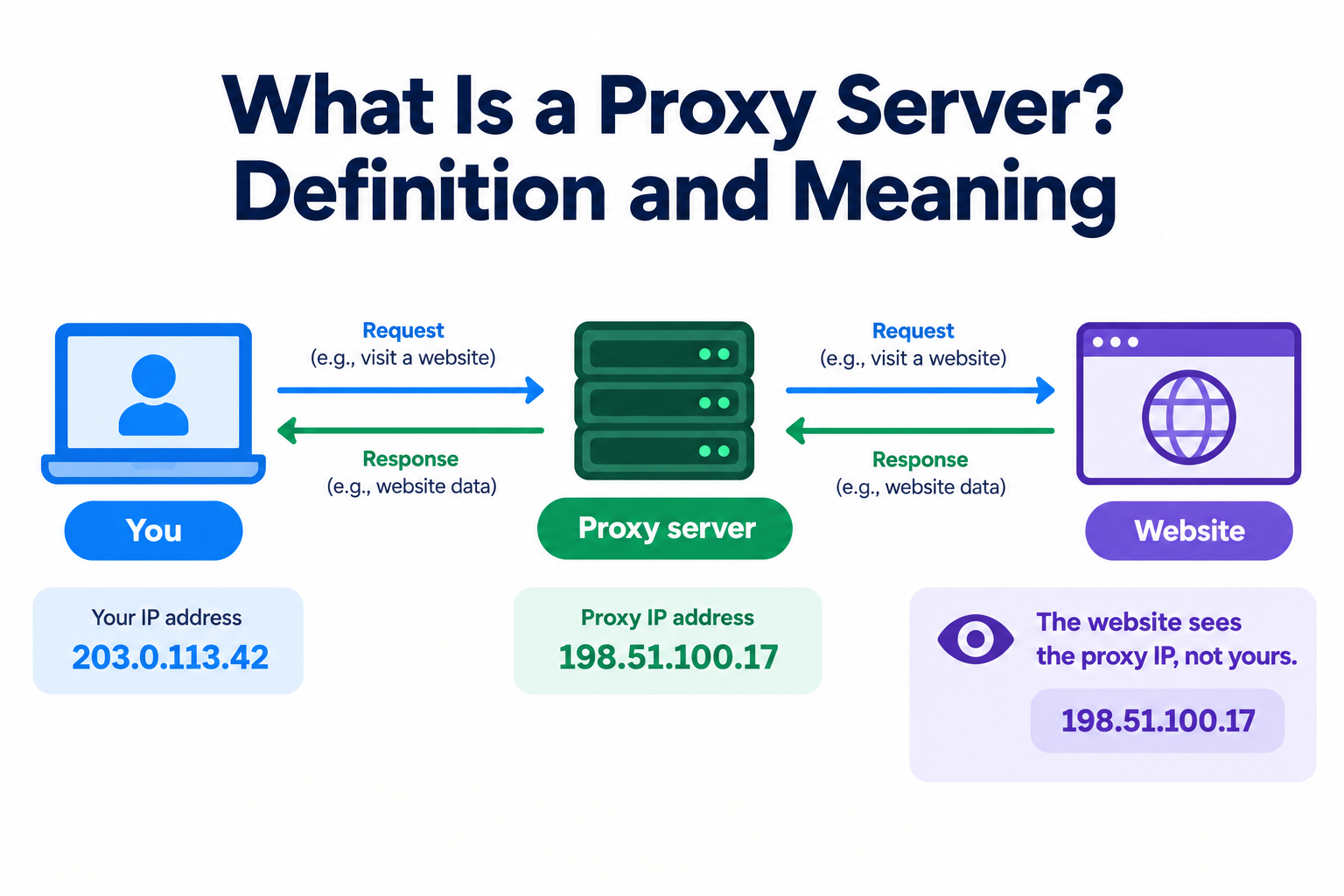
What is a proxy server? It is an intermediary computer or service between your device and the internet that forwards requests using its own IP address instead of yours. This is the practical proxy server definition. It changes the visible sender. It does not encrypt the request by itsel
If you have ever typed what is proxy server into a search box, the short answer is simple. In everyday language, the word means someone authorised to act on another person's behalf. That is the plain proxy server meaning. Your device is the client. The destination website is the other party. The gateway stands between them and presents its own address. Your browser or app sends a request to the intermediate system first, rather than contacting the target website directly.
An IP address works like a postal address. It tells websites where to send replies. When you route traffic through this intermediary, the site sees the middle machine's address, not the one tied directly to your device. That separation is why the term is useful for privacy and access control. A student on a campus network can request a page through one. The page's server sees the intermediary's IP, just as a letter sent through a mail-forwarding service shows the forwarder's return address.
HTTP proxies work at the application level, where browsers and websites exchange messages.
Key takeaways
- It is an intermediary between your device and websites.
- It hides your visible IP address from the destination site.
- It does not encrypt traffic by itself.
- People use it for privacy, access control, caching and data work.
What Does a Proxy Server Do? How It Works Step by Step
What does a proxy server do? It intercepts your request, forwards it to the website, and returns the response. Normally your device connects directly. With a proxy, traffic first passes through the proxy’s address and port. Depending on the protocol, it may also check authentication rules or cache repeated requests.
The request flow in 5 steps
- Your app sends a request to the proxy server’s address and port.
- If the proxy requires login, it includes username and password authentication.
- The proxy checks filtering rules, access control, and its cache.
- It forwards the request to the website using its own IP address.
- The website replies, and the proxy returns the response to you.
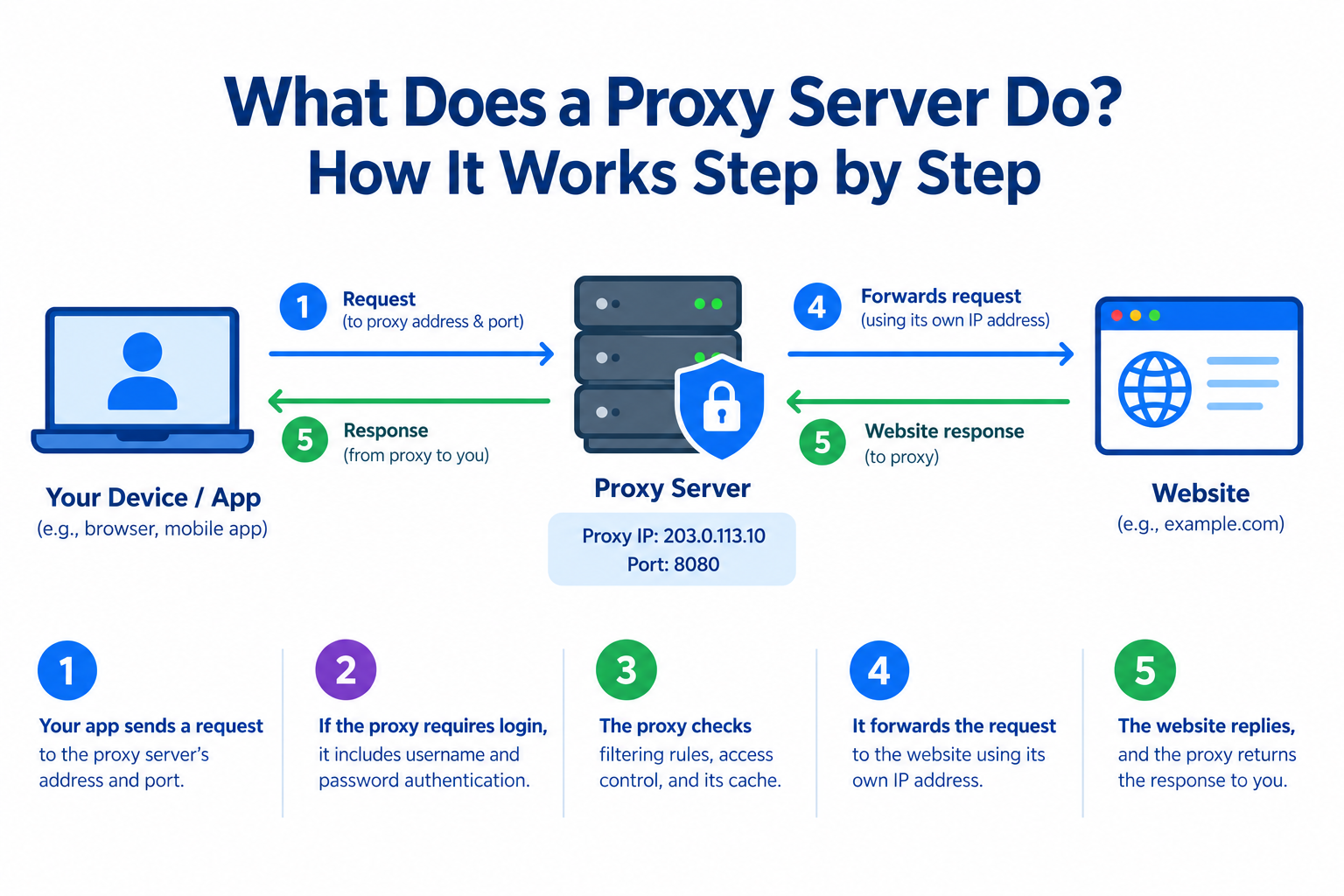
This same request flow works for an HTTP proxy and a SOCKS5 proxy.
Caching can save bandwidth because the proxy can serve a stored copy locally.
Filtering can block a request or limit access by policy.
The destination server sees the intermediary as the client, not your device.
Your device still receives the page content, but the website never sees your IP address.
The site logs the proxy address instead.
For example, an employee opens a news site. The office proxy checks the URL against a block list. It finds a cached copy from a colleague. It returns that copy without contacting the news site again.
What the website, the proxy and your ISP can see
A proxy server changes who sees your address. It does not erase observers.
Who | Sees your real IP address? | Sees the websites you visit? | Sees page content on HTTPS sites? |
|---|---|---|---|
Destination website | No | Only its own site | No |
Proxy server | Yes | Yes | Depends |
Your internet provider | Yes | Only the proxy connection | No |
If you visit an online store through a proxy, the store logs the proxy IP. The proxy operator can see the store’s domain. Your ISP sees only a connection to the proxy.
HTTPS keeps page content encrypted between your browser and the site, even through an HTTP proxy tunnel. Anonymity is partial. The operator’s logs still matter. A proxy moves trust. It does not remove it.
What Is a Proxy Server Used For?
What is a proxy server used for? It hides or changes the visible IP address, controls or filters traffic, speeds up repeated requests, and supports web testing or data collection at scale.
Everyday and personal uses
For personal browsing, a proxy changes the public address that sites see. It gives partial privacy, but it does not encrypt your traffic by itself.
- Hides your IP: Websites see the intermediary address instead of your device.
- Shows region-specific content: A traveller can check a local retailer’s prices and shipping options as if browsing from another country.
- Limits IP-based tracking: Fewer sites can tie requests directly to your home address.
- Bypasses basic geo-restrictions: It can reach limited pages or network-blocked sites where local law and site terms allow it.
A proxy is not a replacement for a VPN when you need encryption. For quick IP changes, it is lighter. For sensitive work, always use encrypted connections or a VPN.
Business and network uses
A proxy server helps organisations control and inspect outgoing web traffic.
- Policy enforcement: staff can reach approved sites only.
- Content filtering: it blocks known malware domains and restricted categories.
- Caching: repeated downloads are served locally, saving bandwidth.
- IP masking: internal addresses stay hidden from outside sites.
- Logging: audits show which pages were visited and when.
A reverse proxy works the other way. It protects web servers and spreads requests through load balancing. That keeps a busy site fast and limits exposure of backend systems.
Enterprise proxy deployments are built into the network. A consumer version usually lives on one device.
For example, a 200-person company routes office browsing through one filter that blocks malicious domains and keeps compliance logs.
Data collection, testing and monitoring
Some jobs require many requests to look like ordinary visitors from separate locations. A proxy server can send each request through a different visible IP. This helps avoid blocks and shows location-specific results. Such checks reveal how a service behaves for distinct audiences. The IP source matters because websites judge IP reputation differently for datacenter, residential and mobile addresses.
- Price monitoring: compare offers without triggering rate limits.
- Ad verification: a marketer checks a paid ad from proxies in three cities.
- SEO monitoring: view search results as users in target regions.
- Web scraping and testing: gather public data or test apps and pages from multiple locations.
Types of Proxy Servers
Types of proxy servers fall into four groups. Direction shows whether it serves clients or websites. Anonymity controls how much of your address remains visible. Protocol means HTTP or SOCKS5. IP source means datacenter, residential, or mobile. Each choice carries limits.
Forward proxy vs reverse proxy
A forward proxy acts for the client. It sits in front of users and sends their requests to the internet. For example, an office may use one to manage outgoing web traffic.
A reverse proxy acts for the server. It sits in front of websites and receives incoming requests before passing them to the origin server. Large sites often use it for load balancing, TLS termination, and protection.
- Serves users.
- Hides user addresses.
- Serves websites.
- Shields backend servers.
Most people mean this one when they say “proxy server.”
Transparent, anonymous and high-anonymity proxies
Visibility levels describe how much identifying information the destination site can infer. A transparent proxy intercepts traffic without configuration and often passes the original IP in headers. For example, a school network can filter sites without students changing settings.
- Transparent proxy: your IP remains visible.
- Anonymous proxy: hides your IP, but reveals that a proxy is present.
- High anonymity proxy: tries to hide both your IP and proxy signals.
Some free proxies claim elite status while logging or leaking data. Such labels can be false, misleading, or unsafe in practice.
HTTP, HTTPS and SOCKS5 proxies
Protocol types define how your app talks to the relay. An HTTP proxy is built for web traffic and understands browser requests. HTTPS encrypts the website connection, not the relay. A SOCKS5 proxy operates at a general TCP level and can carry non-web connections. Neither one adds encryption by itself. Browser support for authentication varies, so a login-protected SOCKS5 connection may need another tool.
- HTTP/HTTPS: ordinary page loading.
- SOCKS5: desktop apps, clients or other non-browser software.
For example, a browser can use the first, while a chat app may need the second.
Datacenter, residential and mobile proxies: where the IP comes from
The IP address source strongly shapes trust, speed, availability and price.
- Datacenter proxy: IPs from hosting companies are fast and affordable, but easier for sites to flag.
- Residential: addresses from home internet connections. They resemble ordinary visitors, yet usually cost more.
- Mobile: IPs from a 4G/5G carrier network via SIM-based hardware. Real subscribers share such addresses. Sites often treat them as normal phone users, but they rely on carrier infrastructure.
A residential proxy looks more human, while a mobile proxy suits phone-only checks. The right choice depends on task and budget.
A shared proxy serves several users, while a dedicated proxy serves one user alone. Exclusivity reduces noise from other people.
A rotating proxy changes the visible IP automatically. A sticky session keeps one address for a limited period.
For example, an ad-verification team may check a mobile-only campaign through carrier IPs because the campaign targets mobile users.
Proxy Server vs VPN vs Firewall: What's the Difference?
A proxy server and a VPN both change how your traffic reaches the internet, but they solve different problems. That intermediary forwards requests for one configured app and usually does not encrypt data. A VPN creates a system-wide encrypted tunnel.
A firewall does not replace either. It allows or blocks traffic by rules and rarely changes your visible IP. A secure web gateway sits between these tools, filtering web requests for policy and security.
The trade-off is coverage versus precision. A VPN protects every connection, but it adds encryption overhead. A proxy gives targeted IP control with lower latency, yet leaves other apps exposed.
Feature | Proxy server | VPN | Firewall |
|---|---|---|---|
Main purpose | Forward requests for selected apps | Encrypt and route all device traffic | Allow or block traffic by rules |
Encrypts traffic? | No, unless the app uses HTTPS | Yes, inside the tunnel | No |
Scope | Per app or configured browser | Whole device | Whole network interface or device |
Changes your visible IP? | Yes, for the configured app | Yes, for all traffic | No by itself |
Typical performance impact | Low latency, plus one hop | Higher latency from encryption | Usually minimal |
Task determines the better tool. On public Wi-Fi, a VPN protects a laptop from other users on the network. A proxy fits a script that must appear to browse from a specific city. They are complementary tools, not rivals.
Are Proxy Servers Safe? Limitations and Risks
Proxy servers are safe when a trusted operator runs them correctly. They are risky when encryption, logging, or access controls are weak. A proxy shifts trust to its owner, and misconfiguration can expose the very data you meant to protect.
Main risks of free and public proxies
Random free proxies often trade convenience for exposure. Many offer no encryption by default. Because the relay sees your traffic, trust moves to an unknown operator.
- Data logging: browsing targets, cookies, or credentials may be recorded and sold.
- Content injection: ads or altered pages can be inserted into responses.
- Man-in-the-middle attack: weak or hostile relays can tamper with unencrypted requests.
- Latency: shared public servers can become slow or fail completely.
- IP leaks: misconfigured relays may expose the original address.
For example, if a person logs into an account through a listed public proxy, the operator may see unencrypted HTTP credentials. Business proxies carry different trade-offs, such as scale, latency, and compatibility, not the same blind trust.
How to lower the risk when you use a proxy
Lower risk before you trust any proxy server with real traffic or logins.
- Use HTTPS sites only.
- Do not enter passwords or payment data through unknown proxies.
- Prefer login-based access over open access.
- Review provider reputation and terms.
- Check the visible IP first and test for a DNS leak.
For example, if a small agency checks local search results, it may choose a paid mobile proxy for the task instead of a public list. OnlineProxy is one example of this model. It provides access through modems and SIM routers using real 4G/5G carrier IPs. Authentication uses username and password, with HTTP and SOCKS5 protocols and 24/7 support. You can check proxy online before starting work.
Proxy Server FAQ
Is a proxy server legal?
Generally, yes in most places. It becomes illegal when used to break local laws, bypass protected systems, or commit fraud. Legality depends on the country and purpose, so check local rules and each site’s terms before sensitive work.
Does a proxy server hide my IP address completely?
No. It hides your address from the destination website, which sees the proxy’s address instead. The operator can still see your requests. Logs, leaks, or misconfiguration can also expose your real IP address, so it reduces exposure without creating full anonymity.
What is an example of a proxy server?
A company web proxy is a common example. It requests pages for employees and applies access rules. A reverse proxy can also sit in front of a website, receiving visitor requests and distributing them across backend servers.
What is the difference between a business proxy server and a consumer proxy server?
A business proxy is built into a network to control access, log activity, cache pages, or protect internal users. The consumer version is usually configured by one person to change location, hide an address, or reach restricted content on their own device.
How can I tell if I am using a proxy server?
Check an IP-check page and compare the shown IP address with your normal connection. Then review your operating system or browser proxy settings. If the displayed address changes after enabling one, traffic likely routes through it until you disable it.
Is a proxy server the same as a VPN?
No. A proxy server forwards traffic for a chosen app and usually does not encrypt it. A VPN creates a device-wide tunnel and encrypts all activity. They solve different problems, so a proxy may handle one browser while a VPN protects the whole device.
Proxy Server Basics: Key Takeaways
- What a proxy server is: an intermediary that forwards requests using its own IP address.
- What it does: hides your origin. It filters traffic, caches pages, controls access and reduces online tracking exposure.
- What it does not do: it does not encrypt traffic, so HTTPS still matters.
- Recap: a request goes out as the proxy. It returns through the same intermediary, and websites never see your own IP address.
Types and VPN comparisons clarify the choice, but trust and the right type decide safety.